

No price development information for this product.
Product unavailable
This product is end of life or currently not available.
This product is end of life or currently not available.
Specifications
Description
Store availability
Delivery
Price development
| EAN | 4710700925461 |
| Source: Icecat.biz | |
- Complies with wireless 802.11n and 802.11b/g standards
- Increases the wireless speed up to 12 times faster and extends the coverage 5 times further *
- Supports EZview to manage LAN device
- Includes 16-languages setup wizard for Internet connection, password, wireless settings and firmware upgrade
- Supports WPS configuration button
- Supports WMM, WEP, WPA, WPA2, DDNS, QoS, IP/MAC filter, DMZ and virtual server.
Wireless-N Broadband Router
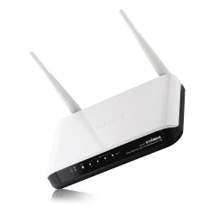
Edimax BR-6424n is a wireless 11n solution for home and small business. With advanced MIMO technology, it's wireless data transmission rate can be 12 times better (up to 300Mbps) and 5 times better coverage than a standard 802.11g/b router. BR-6424n is a high performance and cost-effective solution for home and small business.
Edimax EZView and Remote Management
Edimax EZView is a new enhanced management system in BR-6424n which allows you to manage your router locally or remotely from the Internet. UPnP compatible devices are automatically detected and information about the device will be listed in the management interface of the router. You will be able to directly manage device information like IP address, bandwidth control, open ports and DMZ.
Wi-Fi Protected Setup (WPS)
Press the WPS button to activate the wireless protection. One-Click WPS button helps you to setup a secure wireless network in a minute.
Easy Setup with EZMax Multi-language Installation CD *
A unique Multi-language Setup Wizard is provided in the installation CD. You can setup the router to the Internet within minutes by following the simple animated steps.
Switch for Wireless ON/OFF
EDIMAX BR-6424n features a control button on its back panel to enable you easily switch on/off the Wi-Fi wireless connection. When you want to use only wired connection, you can simply pause the Wi-Fi option by pressing the button without making any extra setting .
* The EZMax Setup CD Wizard only supports Edimax wireless router.
* Maximum performance will vary depending on network conditions and environmental factor
- Increases the wireless speed up to 12 times faster and extends the coverage 5 times further *
- Supports EZview to manage LAN device
- Includes 16-languages setup wizard for Internet connection, password, wireless settings and firmware upgrade
- Supports WPS configuration button
- Supports WMM, WEP, WPA, WPA2, DDNS, QoS, IP/MAC filter, DMZ and virtual server.
Wireless-N Broadband Router
Edimax BR-6424n is a wireless 11n solution for home and small business. With advanced MIMO technology, it's wireless data transmission rate can be 12 times better (up to 300Mbps) and 5 times better coverage than a standard 802.11g/b router. BR-6424n is a high performance and cost-effective solution for home and small business.
Edimax EZView and Remote Management
Edimax EZView is a new enhanced management system in BR-6424n which allows you to manage your router locally or remotely from the Internet. UPnP compatible devices are automatically detected and information about the device will be listed in the management interface of the router. You will be able to directly manage device information like IP address, bandwidth control, open ports and DMZ.
Wi-Fi Protected Setup (WPS)
Press the WPS button to activate the wireless protection. One-Click WPS button helps you to setup a secure wireless network in a minute.
Easy Setup with EZMax Multi-language Installation CD *
A unique Multi-language Setup Wizard is provided in the installation CD. You can setup the router to the Internet within minutes by following the simple animated steps.
Switch for Wireless ON/OFF
EDIMAX BR-6424n features a control button on its back panel to enable you easily switch on/off the Wi-Fi wireless connection. When you want to use only wired connection, you can simply pause the Wi-Fi option by pressing the button without making any extra setting .
* The EZMax Setup CD Wizard only supports Edimax wireless router.
* Maximum performance will vary depending on network conditions and environmental factor
Multitronic Vaasa: 0 pcs
Estimated delivery: No delivery info
Estimated delivery: No delivery info
Today: 10:00 - 18:00
Multitronic Pietarsaari: 0 pcs
Estimated delivery: No delivery info
Estimated delivery: No delivery info
Today: 09:00 - 17:00
Multitronic Jyväskylä: 0 pcs
Estimated delivery: No delivery info
Estimated delivery: No delivery info
Today: 10:00 - 17:00
Multitronic Lappeenranta: 0 pcs
Estimated delivery: No delivery info
Estimated delivery: No delivery info
Today: 10:00 - 18:00
Multitronic Mariehamn: 0 pcs
Estimated delivery: No delivery info
Estimated delivery: No delivery info
Today: 10:00 - 17:00
The above technical details are for reference only and may change without notice. We reserve the right to correct printing errors and use illustrations for guidance. Some text may be auto-generated or machine-translated, which could lead to inaccuracies.