

No price development information for this product.
Product unavailable
This product is end of life or currently not available.
This product is end of life or currently not available.
Key Specifications
Choose one or multiple features to search for items that have the same specifications.
Specifications
Description
Store availability
Delivery
Price development
| Weight & dimensions | |
| Keyboard dimensions (WxDxH) | 465 x 200 x 38 mm |
| Keyboard weight | 1.27 kg |
| Keyboard | |
| Device interface | USB |
| Other features | |
| Height | 1.5 in |
| Width | 18.3 in |
| Depth | 7.9 in |
| Compatible operating systems | Microsoft Windows XP, Windows 2000 |
| Design | |
| Internal |  |
| Product colour | Black |
| Mouse | |
| Mouse included | |
| EAN | 5050689509900 |
| Warranty | 1 year |
| Source: Icecat.biz | |
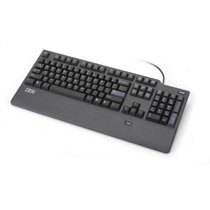
All your passwords at the tip of your finger. The new Preferred Pro USB Keyboard with Fingerprint Reader lets users gain access to protected files with the swipe of a finger, rather than typing a password for each application. With this biometric solution to authentication users can choose either to have the convenience of simple fingerprint authentication only, or to configure one of the most secure log-in processes available.
Features & Benefits:
- An integrated fingerprint swipe sensor puts all your passwords at the tip of your finger
- Software configurable for simple fingerprint only log-in or more secure authentication
- Includes Fingerprint Reader software
- Compatible with the Embedded Security Subsystem (ESS) and Client Security Software (CSS)(1) for one of the most secure log-in processes available:
- A Password Manager replaces multiple passwords with one easy-to-remember password or fingerprint, thereby reducing password reset calls to help desks
- Supports Lotus Notes fingerprint reader authentication
- On-the-fly file and folder encryption(2) saves time by automatically encrypting files and helping to protect data from unauthorised access
- Full sized USB keyboard delivers a comfortable design and feel
- The Blue Button guides users to a variety of information and tools to help set up, understand, maintain, and enhance their ThinkPad notebook or ThinkCentre desktop
- (1) The most secure log-in process is achieved when used in conjunction with the ESS and CSS available on select models of ThinkCentre desktop and ThinkPad notebook computers configured to require both fingerprint and password authentication. When active the ESS requires users to type in a passphrase once per boot up, even if the system is configured for fingerprint authentication only. Non-ESS models can be configured for fingerprint only authentication that does not require typing in a password. This configuration offers convenience, but security is not significantly better than using typed passwords only
- (2) The ESS features an embedded security chip and software users can download to provide encryption for their documents and files. It also stores their encryption keys in the hardware chip, providing a heightened level of protection not available on a PC from any other manufacturer.
Features & Benefits:
- An integrated fingerprint swipe sensor puts all your passwords at the tip of your finger
- Software configurable for simple fingerprint only log-in or more secure authentication
- Includes Fingerprint Reader software
- Compatible with the Embedded Security Subsystem (ESS) and Client Security Software (CSS)(1) for one of the most secure log-in processes available:
- A Password Manager replaces multiple passwords with one easy-to-remember password or fingerprint, thereby reducing password reset calls to help desks
- Supports Lotus Notes fingerprint reader authentication
- On-the-fly file and folder encryption(2) saves time by automatically encrypting files and helping to protect data from unauthorised access
- Full sized USB keyboard delivers a comfortable design and feel
- The Blue Button guides users to a variety of information and tools to help set up, understand, maintain, and enhance their ThinkPad notebook or ThinkCentre desktop
- (1) The most secure log-in process is achieved when used in conjunction with the ESS and CSS available on select models of ThinkCentre desktop and ThinkPad notebook computers configured to require both fingerprint and password authentication. When active the ESS requires users to type in a passphrase once per boot up, even if the system is configured for fingerprint authentication only. Non-ESS models can be configured for fingerprint only authentication that does not require typing in a password. This configuration offers convenience, but security is not significantly better than using typed passwords only
- (2) The ESS features an embedded security chip and software users can download to provide encryption for their documents and files. It also stores their encryption keys in the hardware chip, providing a heightened level of protection not available on a PC from any other manufacturer.
Multitronic Vaasa: 0 pcs
Estimated delivery: No delivery info
Estimated delivery: No delivery info
Today: 10:00 - 18:00
Multitronic Pietarsaari: 0 pcs
Estimated delivery: No delivery info
Estimated delivery: No delivery info
Today: 09:00 - 17:00
Multitronic Jyväskylä: 0 pcs
Estimated delivery: No delivery info
Estimated delivery: No delivery info
Today: 10:00 - 17:00
Multitronic Lappeenranta: 0 pcs
Estimated delivery: No delivery info
Estimated delivery: No delivery info
Today: 10:00 - 18:00
Multitronic Mariehamn: 0 pcs
Estimated delivery: No delivery info
Estimated delivery: No delivery info
Today: 10:00 - 17:00
The above technical details are for reference only and may change without notice. We reserve the right to correct printing errors and use illustrations for guidance. Some text may be auto-generated or machine-translated, which could lead to inaccuracies.