

Информация об изменение цен для данного товара отсутствует.
Товар не доступен
Данный товар более не продается или в настоящий момент не может быть приобретен.
Данный товар более не продается или в настоящий момент не может быть приобретен.
Характеристики
Описание
Наличие в магазинах
Доставка
Динамика цен
| Системные требования | |
| Поддерживаемые операционные системы Windows | Windows 10 Education, Windows 10 Education x64, Windows 10 Enterprise, Windows 10 Enterprise x64, Windows 10 Home, Windows 10 Home x64, Windows 10 Pro, Windows 10 Pro x64, Windows 7 Enterprise, Windows 7 Enterprise x64, Windows 7 Home Basic, Windows 7 Home Basic x64, Windows 7 Home Premium, Windows 7 Home Premium x64, Windows 7 Professional, Windows 7 Professional x64, Windows 7 Starter, Windows 7 Starter x64, Windows 7 Ultimate, Windows 7 Ultimate x64, Windows 8, Windows 8 Enterprise, Windows 8 Enterprise x64, Windows 8 Pro, Windows 8 Pro x64, Windows 8 x64, Windows 8.1, Windows 8.1 Enterprise, Windows 8.1 Enterprise x64, Windows 8.1 Pro, Windows 8.1 Pro x64, Windows 8.1 x64, Windows Vista Business, Windows Vista Business x64, Windows Vista Enterprise, Windows Vista Enterprise x64, Windows Vista Home Basic, Windows Vista Home Basic x64, Windows Vista Home Premium, Windows Vista Home Premium x64, Windows Vista Ultimate, Windows Vista Ultimate x64, Windows XP Home, Windows XP Home x64, Windows XP Professional, Windows XP Professional x64 |
| Поддерживаемые операционные системы Mac | Mac OS X 10.10 Yosemite, Mac OS X 10.11 El Capitan, Mac OS X 10.6 Snow Leopard, Mac OS X 10.7 Lion, Mac OS X 10.8 Mountain Lion, Mac OS X 10.9 Mavericks |
| Поддерживаемые серверные операционные системы | Windows Server 2003, Windows Server 2003 R2, Windows Server 2008, Windows Server 2008 R2, Windows Server 2012, Windows Server 2012 R2 |
| Поддерживаемые мобильные операционные системы | Android, Windows RT, iOS |
| Порты и интерфейсы | |
| Количество портов USB 2.0 | 1 |
| Стандартные интерфейсы | Ethernet, USB 2.0, Беспроводная LAN |
| USB порт |  |
| Вес и размеры | |
| Вес | 11,4 kg |
| Высота | 291 mm |
| Ширина | 463 mm |
| Глубина | 394 mm |
| Печать | |
| Максимальное разрешение | 600 x 1200 DPI |
| Технология печати | Струйная печать |
| Время выхода первой страницы (цвет, норм. качество) | 7 s |
| Время выхода первой страницы (ч/б, норм. качество) | 6 s |
| Двусторонняя печать | |
| Тип дюплексной печати | Авто |
| Печать | Colour printing |
| Сканирование | |
| Тип сканера | Планшетный сканер с автоматической подачей документов |
| Разрешение оптического сканирования | 1200 x 1200 DPI |
| Технология сканирования | CIS |
| Двустороннее сканирование | |
| Сканировать в | Облачный, Электронная почта, HTTP, USB |
| Максимальная область сканирования | 216 x 297 mm |
| Глубина входного цвета | 48 bit |
| Выходная глубина цвета | 24 bit |
| Сканирование | Colour scanning |
| Копирование | |
| Масштабирование копии | 25 - 400% |
| Максимальное число копий | 99 копий |
| N-в-1 copy функция (N=) | 2, 4 |
| Копирование | Colour copying |
| N-в-1 copy функция | |
| Факс | |
| Скорость модема | 33.6 Kbit/s |
| Скорость передачи факса | 3 с/стор |
| Память факса | 315 страниц |
| Максимальное число номеров быстрого набора | 100 |
| Факс | Colour faxing |
| Разрешение факса (ч/б) | 300 x 300 DPI |
| Разрешение факса (цвет) | 200 x 200 DPI |
| Энергопитание | |
| Потребляемая мощность (выкл.) | 0,2 W |
| Потребляемая мощность (в режим ожидания) | 1.7 W |
| Потребляемая мощность при копировании | 25 W |
| Обычное потребление Энергии в соответствии с Energy Star | 0.2 kWh/week |
| Частота входящего переменного тока | 50 - 60 Hz |
| Входящее напряжение сети | 100 - 240 V |
| Внешние условия | |
| Диапазон относительной влажности при эксплуатации | 10 - 80% |
| Диапазон рабочих температур | 15 - 30 °C |
| Сеть | |
| Wi-Fi стандартов | 802.11b, 802.11g, Wi-Fi 4 (802.11n) |
| Алгоритмы шифрования данных | WEP, WPA-PSK, WPA2-PSK |
| Свивка кабеля | 10/100Base-T(X) |
| Подключение Ethernet | |
| Wi-Fi | |
| Скорость передачи данных Ethernet LAN | 10,100 Мбит/с |
| Технологии мобильной печати | Apple AirPrint, Google Cloud Print |
| Типы и характеристики бумаги | |
| Размеры конвертов | 10, C5, DL, Monarch |
| ISO A-форматы (А0…А9) | A4, A5 |
| ISO B-форматы (B0…B9) | B5 |
| Изменяемая ширина носителя | 89 - 215,9 mm |
| Изменяемая длина носителя | 127 - 355.6 mm |
| Размеры фотобумаги | 10x15,13x18,20x25 |
| Максимальный размер бумаги ISO A-формата | A4 |
| Типы материалов для печати | Конверты, Глянцевая бумага, Высокое разрешение бумаги, Матовая бумага, Обычная бумага, Semi-glossy paper |
| Вес лотка подачи материалов для печати | 64 - 105 g/m² |
| Содержимое упаковки | |
| Поставляемое ПО | Canon Quick Toolbox, Scanning Utility, Easy-WebPrint EX |
| Прочие свойства | |
| Уровень шума | 54 dB |
| Загружаемое программное обеспечение | MAXIFY Printing Solutions, Canon Print Service |
| Дизайн | |
| Диагональ экрана | 7,37 cm (2.9") |
| Цвет товара | Черный |
| Тип управления | Сенсорный |
| Сенсорный экран | |
| Встроенный экран | |
| Позиционирование на рынке | Бизнес |
| Цветной дисплей | |
| Характеристики | |
| Встроенный кардридер |  |
| Свойства | |
| Число картриджей для печати | 4 |
| Максимальный рабочий цикл | 30000 pages per month |
| Цвета печати | Черный, Голубой, Пурпурный, Желтый |
| Рекомендуемый рабочий цикл | 200 - 1500 стр/мес |
| Логистические данные | |
| Код гармонизированной системы описания (HS) | 84433100 |
| Входная и выходная емкость | |
| Маскимальная вместимость на входе | 250 листов |
| Емкость автоподатчика бумаги | 50 листов |
| Тип подачи бумаги | Кассета |
| Общее количество лотков подачи бумаги | 1 |
| Общий объем подачи бумаги | 250 листов |
| Автоподатчик (ADF) | |
| EAN | 4549292077339 |
| Гарантия | 1 год |
| Source: Icecat.biz | |
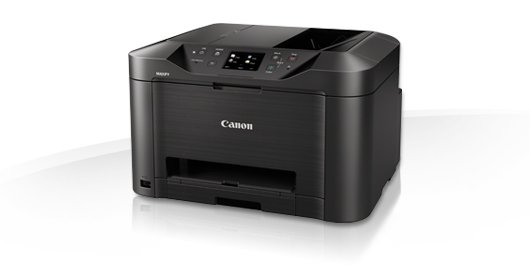
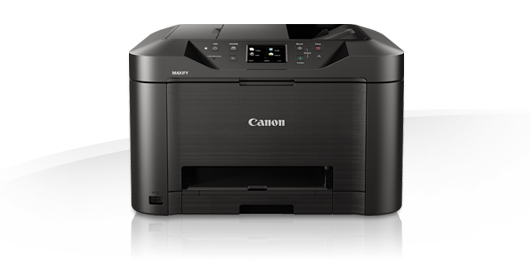
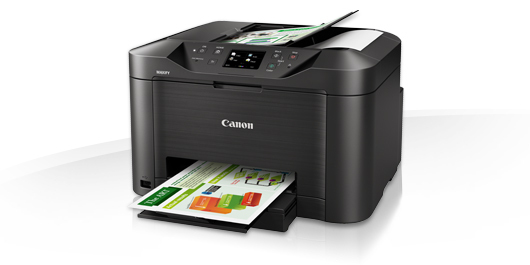
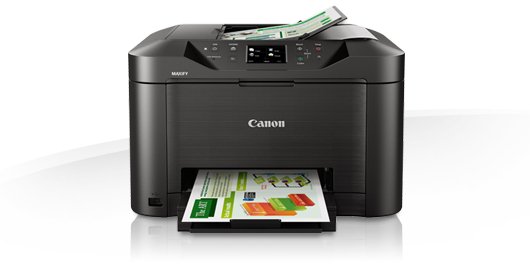
A heavy-duty multifunction colour inkjet printer, scanner, copier and fax, with support for mobile devices and cloud services, fast 24 ipm mono print speed and easy network integration.
Small office, huge productivity
A fully featured printer, scanner, copier and fax designed for smaller offices that still need great mono and colour print quality while being economical to run. Marker- and friction-resistant DRHD Pigment inks produce strong blacks, deep colours and crisp text. The Canon MAXIFY MB5150 Series prints A4 at an ultra-fast 24 ipm in mono and 15.5 ipm in colour, plus a first page out time (FPOT) is just 6 seconds, while single pass two-sided scanning means you can scan faster than ever.
Superb print economy
From its low energy consumption of just 0.2kWh (TEC) to the individually replaceable colour cartridges, economy is a priority. Black cartridges provide an ISO yield of 2,500 pages and colour cartridges 1,500 pages, letting your office work with fewer interruptions. The optional 4-colour multipack offers even more cost-effective printing.
Increased productivity and ease of use
Printing, copying, scanning or faxing is simple, with the Canon MAXIFY MB5150 Series’ large 8.8 cm (3.5”) TFT colour touchscreen and improved user interface. In addition to its high-capacity 250-sheet feeder and 50-sheet automatic document feeder, the printer’s double-sided printing and support for a variety of paper sizes and types – from A4 plain paper, to labels, envelopes, photo paper and even two-sided ID card copying – make light work of common office print jobs.
Mobile-ready, cloud-ready, work-ready
Support for Google Cloud Print, Apple AirPrint (iOS), Mopria and the Canon PRINT app provide quick and simple printing and scanning from mobile devices. You can print from the cloud and even scan and save documents to popular cloud services, including Google Drive, Dropbox, Evernote, OneNote, OneDrive and Concur. Access Point mode means mobile device users can connect to the printer without a Wi-Fi network.
Comprehensive monitoring and maintenance capabilities
IP address filtering means only a select number of users can be given access, while SMTP email support allows secure scan-to-email. System administrators can quickly and easily configure the printer and restrict certain operations, such as scan-to-USB.
Effortless network integration
Simple Network Management Protocol (SNMP) compatibility makes it easy to integrate the printer into an existing office network. The SNMP standard enables a range of maintenance monitoring functions, including ink levels, error status, and page count.
Small office, huge productivity
A fully featured printer, scanner, copier and fax designed for smaller offices that still need great mono and colour print quality while being economical to run. Marker- and friction-resistant DRHD Pigment inks produce strong blacks, deep colours and crisp text. The Canon MAXIFY MB5150 Series prints A4 at an ultra-fast 24 ipm in mono and 15.5 ipm in colour, plus a first page out time (FPOT) is just 6 seconds, while single pass two-sided scanning means you can scan faster than ever.
Superb print economy
From its low energy consumption of just 0.2kWh (TEC) to the individually replaceable colour cartridges, economy is a priority. Black cartridges provide an ISO yield of 2,500 pages and colour cartridges 1,500 pages, letting your office work with fewer interruptions. The optional 4-colour multipack offers even more cost-effective printing.
Increased productivity and ease of use
Printing, copying, scanning or faxing is simple, with the Canon MAXIFY MB5150 Series’ large 8.8 cm (3.5”) TFT colour touchscreen and improved user interface. In addition to its high-capacity 250-sheet feeder and 50-sheet automatic document feeder, the printer’s double-sided printing and support for a variety of paper sizes and types – from A4 plain paper, to labels, envelopes, photo paper and even two-sided ID card copying – make light work of common office print jobs.
Mobile-ready, cloud-ready, work-ready
Support for Google Cloud Print, Apple AirPrint (iOS), Mopria and the Canon PRINT app provide quick and simple printing and scanning from mobile devices. You can print from the cloud and even scan and save documents to popular cloud services, including Google Drive, Dropbox, Evernote, OneNote, OneDrive and Concur. Access Point mode means mobile device users can connect to the printer without a Wi-Fi network.
Comprehensive monitoring and maintenance capabilities
IP address filtering means only a select number of users can be given access, while SMTP email support allows secure scan-to-email. System administrators can quickly and easily configure the printer and restrict certain operations, such as scan-to-USB.
Effortless network integration
Simple Network Management Protocol (SNMP) compatibility makes it easy to integrate the printer into an existing office network. The SNMP standard enables a range of maintenance monitoring functions, including ink levels, error status, and page count.
Multitronic Vaasa: 0 шт
Срок доставки: Нет информации о доставке
Срок доставки: Нет информации о доставке
Сегодня: 10:00 - 18:00
Multitronic Pietarsaari: 0 шт
Срок доставки: Нет информации о доставке
Срок доставки: Нет информации о доставке
Сегодня: 09:00 - 17:00
Multitronic Jyväskylä: 0 шт
Срок доставки: Нет информации о доставке
Срок доставки: Нет информации о доставке
Сегодня: 10:00 - 17:00
Multitronic Lappeenranta: 0 шт
Срок доставки: Нет информации о доставке
Срок доставки: Нет информации о доставке
Сегодня: 10:00 - 18:00
Multitronic Mariehamn: 0 шт
Срок доставки: Нет информации о доставке
Срок доставки: Нет информации о доставке
Сегодня: 10:00 - 17:00
The above technical details are for reference only and may change without notice. We reserve the right to correct printing errors and use illustrations for guidance. Some text may be auto-generated or machine-translated, which could lead to inaccuracies.