

Информация об изменение цен для данного товара отсутствует.
Товар не доступен
Данный товар более не продается или в настоящий момент не может быть приобретен.
Данный товар более не продается или в настоящий момент не может быть приобретен.
Характеристики
Описание
Наличие в магазинах
Доставка
Динамика цен
| Вес и размеры | |
| Вес | 150 g |
| Диаметр | 6,15 cm |
| Свойства | |
| Цвет товара | Черный |
| EAN | 4960759026842 |
| Гарантия | 2 лет |
| Source: Icecat.biz | |
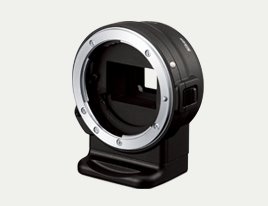
The FT-1 Mount Adapter allows you to use certain legacy F-Mount NIKKOR lenses (those designed for use with Nikon D-SLR/SLR cameras) on the Nikon 1 V1 and J1. The Mount Adapter is attached to the Nikon 1 V1/J1 and the F-Mount NIKKOR lens then attached to the adapter. The FT-1 will add an angle of view of 2.7 times that of the F-Mount NIKKOR lens' focal length.
- To use the FT-1, the Nikon 1 J1/V1 camera's firmware must be updated to at least version 1.10.
- F-mount lenses mounted on the FT-1 have a crop factor of 2.7×. Enjoy an angle of view equivalent to that of a super telephoto lens when a telephoto lens is used. (Example: When using a 300mm lens, the equivalent angle of view is that of an 800mm lens.)
- When using the FT-1 and a compatible AF-S NIKKOR F-Mount lens, users can take full advantage of the Nikon 1's high-speed continuous shooting of 10/30/60 fps. (*When an AF-S lens is used. However, focus is locked with the first shot with continuous shooting.)
- [P], [S], [A], and [M] exposure modes can be used with CPU lenses.
- Vibration reduction (VR) functions when VR lenses are used. Enable vibration reduction, or specify a setting, using switches on the lens. NORMAL/ACTIVE modes are supported when lenses equipped with these modes are used. VR functions in NORMAL mode when lenses not equipped with the NORMAL/ACTIVE modes are used.
- The Smart Photo Selector function cannot be used.
- Supports 65 existing F-mount NIKKOR lenses (*as of December 2011)
- AF/AE supported with AF-S lenses only. Autofocusing is possible when AF-S lenses are used. However, focus mode must be set to AF-S (Single AF) and AF-area mode is fixed at Single-point with only the center focus point used.
- The focus indicator (rangefinder) can be used with CPU lenses.
- [A] and [M] exposure modes can be used with non-CPU lenses. Aperture is specified using the aperture ring on the lens.
- Shooting in Motion Snapshot mode is only possible when focus has been acquired with an AF-S lens.
- To use the FT-1, the Nikon 1 J1/V1 camera's firmware must be updated to at least version 1.10.
- F-mount lenses mounted on the FT-1 have a crop factor of 2.7×. Enjoy an angle of view equivalent to that of a super telephoto lens when a telephoto lens is used. (Example: When using a 300mm lens, the equivalent angle of view is that of an 800mm lens.)
- When using the FT-1 and a compatible AF-S NIKKOR F-Mount lens, users can take full advantage of the Nikon 1's high-speed continuous shooting of 10/30/60 fps. (*When an AF-S lens is used. However, focus is locked with the first shot with continuous shooting.)
- [P], [S], [A], and [M] exposure modes can be used with CPU lenses.
- Vibration reduction (VR) functions when VR lenses are used. Enable vibration reduction, or specify a setting, using switches on the lens. NORMAL/ACTIVE modes are supported when lenses equipped with these modes are used. VR functions in NORMAL mode when lenses not equipped with the NORMAL/ACTIVE modes are used.
- The Smart Photo Selector function cannot be used.
- Supports 65 existing F-mount NIKKOR lenses (*as of December 2011)
- AF/AE supported with AF-S lenses only. Autofocusing is possible when AF-S lenses are used. However, focus mode must be set to AF-S (Single AF) and AF-area mode is fixed at Single-point with only the center focus point used.
- The focus indicator (rangefinder) can be used with CPU lenses.
- [A] and [M] exposure modes can be used with non-CPU lenses. Aperture is specified using the aperture ring on the lens.
- Shooting in Motion Snapshot mode is only possible when focus has been acquired with an AF-S lens.
Multitronic Vaasa: 0 шт
Срок доставки: Нет информации о доставке
Срок доставки: Нет информации о доставке
Сегодня: Закрыт (Вознесение)
Multitronic Pietarsaari: 0 шт
Срок доставки: Нет информации о доставке
Срок доставки: Нет информации о доставке
Сегодня: Закрыт (Вознесение)
Multitronic Jyväskylä: 0 шт
Срок доставки: Нет информации о доставке
Срок доставки: Нет информации о доставке
Сегодня: Закрыт (Вознесение)
Multitronic Lappeenranta: 0 шт
Срок доставки: Нет информации о доставке
Срок доставки: Нет информации о доставке
Сегодня: Закрыт
Multitronic Mariehamn: 0 шт
Срок доставки: Нет информации о доставке
Срок доставки: Нет информации о доставке
Сегодня: Закрыт (Вознесение)
The above technical details are for reference only and may change without notice. We reserve the right to correct printing errors and use illustrations for guidance. Some text may be auto-generated or machine-translated, which could lead to inaccuracies.