



Информация об изменение цен для данного товара отсутствует.
Товар не доступен
Данный товар более не продается или в настоящий момент не может быть приобретен.
Данный товар более не продается или в настоящий момент не может быть приобретен.
Коротко о товаре
Найдите похожие товары выбрав одну или несколько ключевых особенностей товара.
Характеристики
Описание
Наличие в магазинах
Доставка
Динамика цен
| Системные требования | |
| Поддерживаемые операционные системы Windows | Windows 7 Enterprise, Windows 7 Enterprise x64, Windows 7 Home Basic, Windows 7 Home Basic x64, Windows 7 Home Premium, Windows 7 Home Premium x64, Windows 7 Professional, Windows 7 Professional x64, Windows 7 Starter, Windows 7 Starter x64, Windows 7 Ultimate, Windows 7 Ultimate x64, Windows 8, Windows 8 Enterprise, Windows 8 Enterprise x64, Windows 8 Pro, Windows 8 Pro x64, Windows 8 x64, Windows 8.1, Windows 8.1 Enterprise, Windows 8.1 Enterprise x64, Windows 8.1 Pro, Windows 8.1 Pro x64, Windows 8.1 x64 |
| Поддерживаемые операционные системы Mac | Mac OS X 10.10 Yosemite, Mac OS X 10.8 Mountain Lion, Mac OS X 10.9 Mavericks |
| Вес и размеры | |
| Высота | 48,4 mm |
| Ширина | 85,7 mm |
| Глубина | 126 mm |
| Вес мыши | 145 g |
| Глубина приемника | 1,87 cm |
| Высота приемника | 6,1 mm |
| Ширина приемника | 1,44 cm |
| Вес приемника | 1,8 g |
| Энергопитание | |
| Технология батареи | Lithium Polymer (LiPo) |
| Емкость батареи | 500 mAh |
| Источник питания | Batteries |
| Время работы батареи (макс) | 240 h |
| Устройство ввода | |
| Версия Bluetooth | 4.0 |
| Количество кнопок | 5 |
| Полоса частот | 2.4 |
| Датчик перемещения | Laser |
| Разрешительная способность движения | 1000 DPI |
| Предназначение | Офисная |
| Прокрутка |  |
| Программируемые кнопки мыши | |
| Рекомендованное применение | ПК/ноутбук |
| Интерфейс устройства | Радиочастотный беспроводной+Bluetooth |
| Тип прокрутки | Колесико |
| Тип кнопок | Нажимные кнопки |
| Настраиваемая разрешительная способность движения | |
| Количество режимов разрешительной способности движения | 7 |
| Данные об упаковке | |
| Поставляемые кабели | Микро-USB |
| Поставляемый ресивер | |
| Эргономика | |
| Дальность действия (беспроводная) | 10 m |
| Вкл/Выкл переключатель | |
| Работает на любой поверхности | |
| Дизайн | |
| Формат | Right-hand |
| Цвет товара | Black |
| Интерфейс беспроводного ресивера | USB |
| Тип ресивера | Nano |
| "Объединяющий"приемник | |
| Мышь | |
| Предназначение | Офисная |
| EAN | 5099206056213 |
| Гарантия | 2 лет |
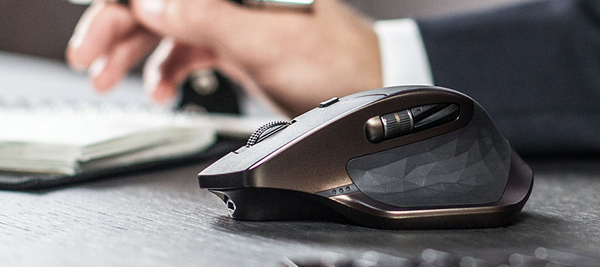
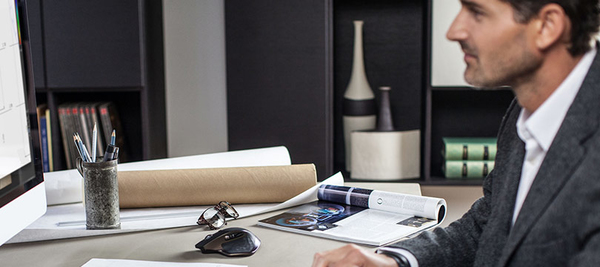
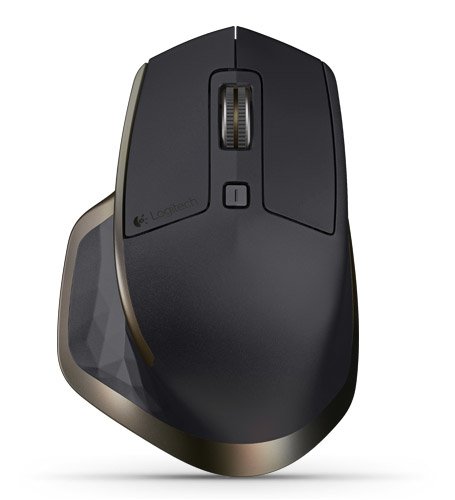
The new revolution is here. MX Master - a precision instrument for masters of their craft
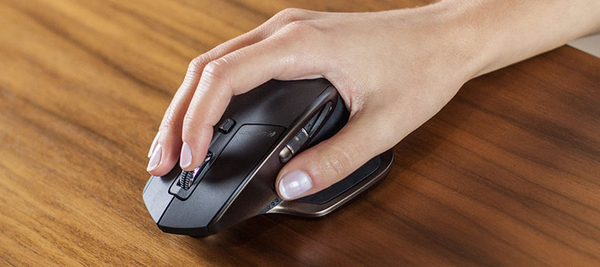
Hand-sculpted comfort contour
The perfectly sculpted, hand crafted shape* of this comfort mouse supports your hand and wrist in a comfortable, natural position.
Experience fine-motion control and fluid experience with well-positioned buttons and wheels.
* Mouse mold manufactured from an original hand sculpted design.
Speed-adaptive scroll wheel
Scroll through long documents or web pages faster and easier. The precision wheel auto-shifts from click-to-click to hyper-fast scroll.
Logitech Options™ software lets you customize this experience.
Unique thumb wheel
Experience side-to-side scrolling with a stroke of your thumb. To unlock the full range of thumb wheel possibilities, install Logitech Options™ software.
Turn pages, switch applications, reassign buttons, and much more using Logitech Options software.
Darkfield Laser Tracking
Darkfield™ Laser Sensor tracks flawlessly virtually anywhere, even on glass* and high-gloss surfaces.
*4 mm minimum thickness
Dual connectivity
Connect this performance mouse via included Logitech Unifying™ Receiver or via Bluetooth Smart wireless technology.
Easy-Switch technology
Pair up to 3 devices and easily switch between them with the touch of a button.
Rechargeable battery
Charge quickly. You can get enough power for a full day of usage in 4 minutes only, with no down time while recharging. A full charge can last up to 40 days*.
When the battery gets low, an indicator light lets you know. Recharging is fast and easy. Just plug MX Master into your computer using the micro-USB charging cable. Continue using your mouse while it charges.
*Based on a 6 hour daily office use. Battery life may vary based on user and computing conditions.
Unlock the possibilities
Install Logitech Options™ software to experience a full range of possibilities of this advanced mouse. Customize buttons and actions to your needs.
Set up and assign tasks to buttons with step-by-step instructions and Setup Guide available to help answer your questions.
Hand-sculpted comfort contour
The perfectly sculpted, hand crafted shape* of this comfort mouse supports your hand and wrist in a comfortable, natural position.
Experience fine-motion control and fluid experience with well-positioned buttons and wheels.
* Mouse mold manufactured from an original hand sculpted design.
Speed-adaptive scroll wheel
Scroll through long documents or web pages faster and easier. The precision wheel auto-shifts from click-to-click to hyper-fast scroll.
Logitech Options™ software lets you customize this experience.
Unique thumb wheel
Experience side-to-side scrolling with a stroke of your thumb. To unlock the full range of thumb wheel possibilities, install Logitech Options™ software.
Turn pages, switch applications, reassign buttons, and much more using Logitech Options software.
Darkfield Laser Tracking
Darkfield™ Laser Sensor tracks flawlessly virtually anywhere, even on glass* and high-gloss surfaces.
*4 mm minimum thickness
Dual connectivity
Connect this performance mouse via included Logitech Unifying™ Receiver or via Bluetooth Smart wireless technology.
Easy-Switch technology
Pair up to 3 devices and easily switch between them with the touch of a button.
Rechargeable battery
Charge quickly. You can get enough power for a full day of usage in 4 minutes only, with no down time while recharging. A full charge can last up to 40 days*.
When the battery gets low, an indicator light lets you know. Recharging is fast and easy. Just plug MX Master into your computer using the micro-USB charging cable. Continue using your mouse while it charges.
*Based on a 6 hour daily office use. Battery life may vary based on user and computing conditions.
Unlock the possibilities
Install Logitech Options™ software to experience a full range of possibilities of this advanced mouse. Customize buttons and actions to your needs.
Set up and assign tasks to buttons with step-by-step instructions and Setup Guide available to help answer your questions.
Multitronic Vaasa: 0 шт
Срок доставки: Нет информации о доставке
Срок доставки: Нет информации о доставке
Сегодня: 10:00 - 18:00
Multitronic Pietarsaari: 0 шт
Срок доставки: Нет информации о доставке
Срок доставки: Нет информации о доставке
Сегодня: 09:00 - 17:00
Multitronic Jyväskylä: 0 шт
Срок доставки: Нет информации о доставке
Срок доставки: Нет информации о доставке
Сегодня: 10:00 - 17:00
Multitronic Lappeenranta: 0 шт
Срок доставки: Нет информации о доставке
Срок доставки: Нет информации о доставке
Сегодня: 10:00 - 18:00
Multitronic Mariehamn: 0 шт
Срок доставки: Нет информации о доставке
Срок доставки: Нет информации о доставке
Сегодня: 10:00 - 17:00
The above technical details are for reference only and may change without notice. We reserve the right to correct printing errors and use illustrations for guidance. Some text may be auto-generated or machine-translated, which could lead to inaccuracies.