

Ingen prisutvecklingsinformation för denna produkt.
Produkten är inte tillgänglig
Produkten har utgått från sortimentet eller är inte tillgänglig för tillfället.
Produkten har utgått från sortimentet eller är inte tillgänglig för tillfället.
Produktspecifikation
Beskrivning
På lager i butiker
Leverans
Prisutveckling
| Tekniska data | |
| Kompatibla operativsystem | Windows XP 32/64, Vista 32/64, Windows 7 32/64 Mac OS X 10.4+ |
| Systemkrav | |
| Minsta systemkrav | 1024x768 |
| Strömtillförsel | |
| USB-ström |  |
| EAN | 875720000698 |
| Source: Icecat.biz | |
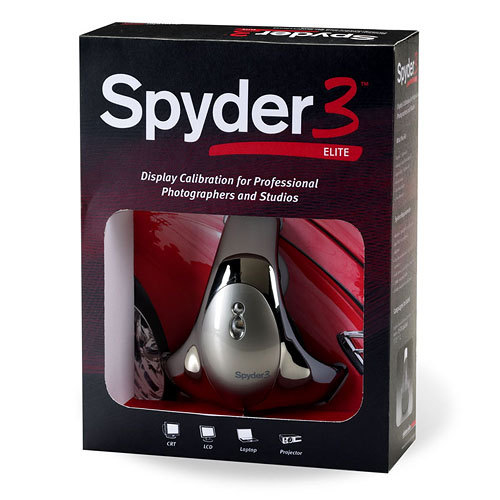
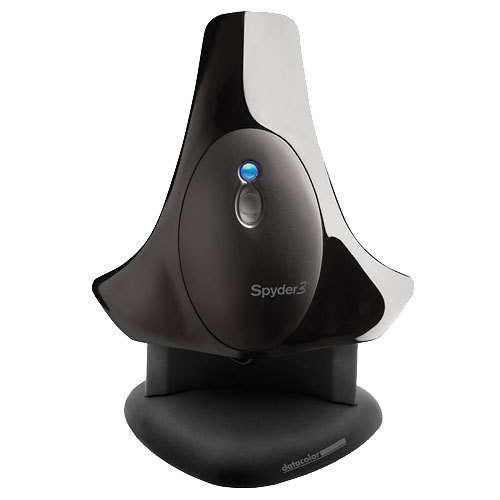
Display Calibration for Professional Photographers and Studios
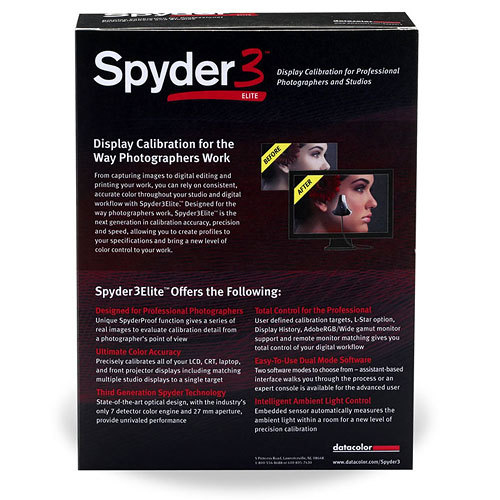
Spyder3 Elite™ was designed for the way photographers work, bringing a new level of color control to imaging. This powerful solution gives photographers the tools to trust the colors on the screen, for reliability and consistency on each of their LCD, laptops, and projectors. Award-winning Spyder3 hardware, with innovative new software features, makes this the ultimate solution for any serious photographer.
You asked and we’re delivering some hot new features just for you, with the richest feature set we have ever offered! New 4.0 features include monitor quality analyzer, display graphing compared to sRGB & Adobe RGB, enhanced iterative gray balancing and automated brightness adjustment.
Designed for:
Professional Photographers, Photography Studios and Professional users of all kinds.
New Monitor Quality Analyzer
gives you the tools to find out just how good your display actually is; and compare it to other displays using easy-to-read maps of your screen’s uniformity, allowing you to determine which areas of your screen are precise enough for the most demanding work
New Display Graph
allows you to compare the gamut of multiple displays to one another, as well as to standard color spaces like sRGB and AdobeRGB. This helps you understand what colors your display can reproduce
New Iterative Gray Balance Option
the most accurate gray balance algorithm available. This gives you the best gray calibration for your display
New Software Brightness Control
allows owners of iMac and other displays with limited controls to work with these displays in more desirable, dimmer environments, and to match them to other displays
New Automated Brightness Adjustment
means users no longer need to adjust front panel controls on Apple Cinema Displays, iMacs, MacBooks or PowerBooks. All brightness adjustments on these screens are done automatically by Spyder software
Front Projector Calibration Option
gives you confidence that all your presentations will look their very best
Intelligent Ambient light Control
automatically measures the ambient light within a room to determine optimal conditions for a new level of precision calibration
StudioMatch Assistant
the best possible match on your entire studio so you can rely on consistent and accurate color and luminance on all your displays
Spyder3 Elite™ was designed for the way photographers work, bringing a new level of color control to imaging. This powerful solution gives photographers the tools to trust the colors on the screen, for reliability and consistency on each of their LCD, laptops, and projectors. Award-winning Spyder3 hardware, with innovative new software features, makes this the ultimate solution for any serious photographer.
You asked and we’re delivering some hot new features just for you, with the richest feature set we have ever offered! New 4.0 features include monitor quality analyzer, display graphing compared to sRGB & Adobe RGB, enhanced iterative gray balancing and automated brightness adjustment.
Designed for:
Professional Photographers, Photography Studios and Professional users of all kinds.
New Monitor Quality Analyzer
gives you the tools to find out just how good your display actually is; and compare it to other displays using easy-to-read maps of your screen’s uniformity, allowing you to determine which areas of your screen are precise enough for the most demanding work
New Display Graph
allows you to compare the gamut of multiple displays to one another, as well as to standard color spaces like sRGB and AdobeRGB. This helps you understand what colors your display can reproduce
New Iterative Gray Balance Option
the most accurate gray balance algorithm available. This gives you the best gray calibration for your display
New Software Brightness Control
allows owners of iMac and other displays with limited controls to work with these displays in more desirable, dimmer environments, and to match them to other displays
New Automated Brightness Adjustment
means users no longer need to adjust front panel controls on Apple Cinema Displays, iMacs, MacBooks or PowerBooks. All brightness adjustments on these screens are done automatically by Spyder software
Front Projector Calibration Option
gives you confidence that all your presentations will look their very best
Intelligent Ambient light Control
automatically measures the ambient light within a room to determine optimal conditions for a new level of precision calibration
StudioMatch Assistant
the best possible match on your entire studio so you can rely on consistent and accurate color and luminance on all your displays
Multitronic Vasa: 0 st
Beräknad leverans: Ingen leverans information
Beräknad leverans: Ingen leverans information
Idag: 10:00 - 18:00
Multitronic Jakobstad: 0 st
Beräknad leverans: Ingen leverans information
Beräknad leverans: Ingen leverans information
Idag: 09:00 - 17:00
Multitronic Jyväskylä: 0 st
Beräknad leverans: Ingen leverans information
Beräknad leverans: Ingen leverans information
Idag: 10:00 - 17:00
Multitronic Villmanstrand: 0 st
Beräknad leverans: Ingen leverans information
Beräknad leverans: Ingen leverans information
Idag: 10:00 - 18:00
Multitronic Mariehamn: 0 st
Beräknad leverans: Ingen leverans information
Beräknad leverans: Ingen leverans information
Idag: 10:00 - 17:00
Avhämtning från butiken
Beräknad leveranstid: Ingen leverans information
Beräknad leveranstid: Ingen leverans information
Posti: Paketautomater och serviceställen
Beräknad leveranstid: Ingen leverans information
Beräknad leveranstid: Ingen leverans information
Posti: Postpaket
Beräknad leveranstid: Ingen leverans information
Beräknad leveranstid: Ingen leverans information
Matkahuolto: Paketautomater och serviceställen
Beräknad leveranstid: Ingen leverans information
Beräknad leveranstid: Ingen leverans information
Posti: Till dörren-paket
Beräknad leveranstid: Ingen leverans information
Beräknad leveranstid: Ingen leverans information
Matkahuolto: Företagspaket
Beräknad leveranstid: Ingen leverans information
Beräknad leveranstid: Ingen leverans information
Matkahuolto: Hempaket
Beräknad leveranstid: Ingen leverans information
Beräknad leveranstid: Ingen leverans information
Posti: Hempaket
Beräknad leveranstid: Ingen leverans information
Beräknad leveranstid: Ingen leverans information
De tekniska uppgifterna ovan är endast avsedda som referens och kan ändras. Vi förbehåller oss rätten att korrigera tryckfel och att använda illustrationer som vägledning. Viss text kan vara autogenererad eller maskinöversatt, vilket kan leda till felaktigheter.