

Produkten är inte tillgänglig
Produkten har utgått från sortimentet eller är inte tillgänglig för tillfället.
Produkten har utgått från sortimentet eller är inte tillgänglig för tillfället.
Produktspecifikation
Välj en eller flera funktioner för att söka efter produkter med samma specifikationer.
Produktspecifikation
Beskrivning
På lager i butiker
Leverans
Prisutveckling
Manuals
| Anslutningar | |
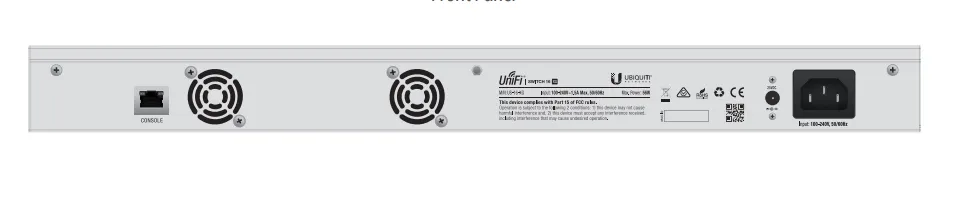
| Konsolport | RJ-45 |
| Typ av grundläggande RJ-45 Ethernet-portar | 10G Ethernet (100/1000/10000) |
| Antal grundläggande RJ-45 Ethernet-portar | 4 |
| Antal SFP+-modulplatser | 12 |
| Strömanslutning | DC-in-uttag |
| Vikt & dimension | |
| Vikt | 2,62 kg |
| Höjd | 43 mm |
| Bredd | 443 mm |
| Djup | 221 mm |
| Strömtillförsel | |
| Strömförbrukning (vanlig) | 36 W |
| Spänning | 25 - 16 V |
| Växelström Frekvens | 50 - 60 hz |
| AC-inspänning | 100 - 240 V |
| Strömförbrukning (max) | 56 W |
| Strömförsörjning ingår |  |
| Miljökrav | |
| Intervall för relativ operativ luftfuktighet | 5 - 95% |
| Temperatur vid drift | -5 - 40 ° C |
| Nätverk | |
| Full duplex | |
| Kommunikationsstandarder | IEEE 802.1x |
| Portspegling | |
| Länkaggregering | |
| Broadcast Storm-kontroll | |
| STP (Spanning Tree Protocol) | |
| VLAN-stöd | |
| 10G stöd | |
| Kabeltyper som stöds | Cat6 |
| Dataöverföring | |
| Switch kapacitet | 320 Gbit/s |
| Jumbo Frames stöd | |
| Hastighet vid vidarebefordran | 238.1 Mpps |
| Förpackning | |
| Förpackningstyp | Låda |
| Monteringsfästen ingår | |
| Skruvar medföljer | |
| Bevakning | |
| Kryptering/säkerhet | 802.1x RADIUS |
| Certifikat | |
| Certifiering | CE, FCC, IC, ETSI300-019-1.4 |
| Management features | |
| Switch-lager | L2 |
| Switch typ | hanterad |
| Förpackningens innehåll | |
| Kabel inkluderad | AC |
| Snabbstartsguide | |
| Design | |
| Rackmontering | |
| Formfaktor | 1U |
| LED-indikatorer | |
| Produktens färg | Grå |
| Återställningsknapp | |
| Antal fläktar | 2 fläkt/-ar |
| Material, hölje | Stål |
| Logistikdata | |
| Harmonized System (HS)-kod | 85176990 |
| EAN | 0810354026010 |
| Garanti | 2 år |
| Source: Icecat.biz | |
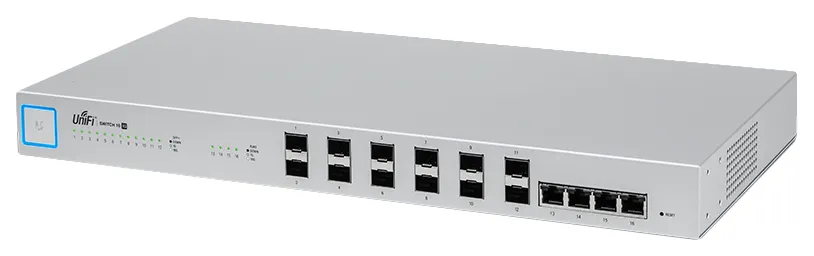
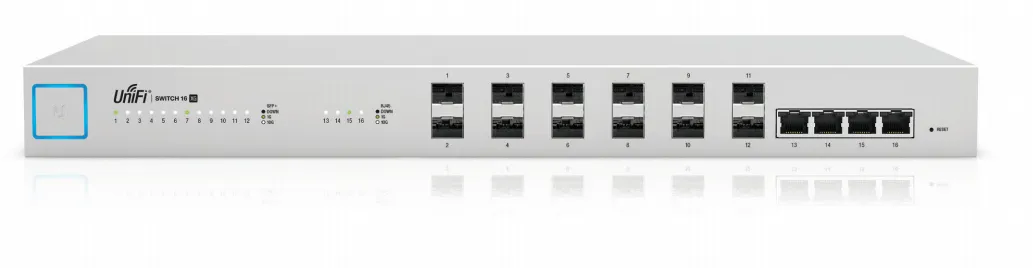
10G Aggregation Switch for Enterprise Networks
Build and expand your network with Ubiquiti Networks® UniFi® Switch 16 XG, part of the UniFi Enterprise System. The
US‑16‑XG is a fully managed, 16-port, 10G fiber switch that enhances network capacity by providing high-bandwidth
aggregation connectivity to multiple switches in your network.
The US‑16‑XG offers an extensive suite of advanced Layer-2 switching features and protocols.
Switching Performance
The US‑16‑XG offers the forwarding capacity to simultaneously process traffic on all ports at line rate without any packet loss.
The total non-blocking throughput is up to 160 Gbps.
10G High-Capacity Links
The US‑16‑XG offers maximum performance and low latency as an aggregation switch.
For fiber connectivity, it features 12 SFP+ ports. For copper connectivity, the US‑16‑XG offers four RJ45 ports that
support 10GBASE-T, the standard for 10 Gbps connections using Cat6 (or higher) cabling and RJ45 connectors.
The US‑16‑XG connects to the following:
- Multiple UniFi Switches and a 1G/10G router via SFP+ ports
- VM, Server, NAS, or other network devices via 1G/10G RJ45 ports
UniFi Controller
Designed for convenient management, the UniFi Controller software allows admins to configure and monitor the UniFi Switch and other UniFi devices using a graphical user interface. You can download it from www.ubnt.com at no cost.
Multi-Site Management
A single instance of the UniFi Controller running in the cloud can manage multiple UniFi sites within a centralized interface. Each site is logically separated and has its own network monitoring, configuration, maps, statistics, and admin accounts.
Switch Configuration
You can access any managed UniFi Switch through the UniFi Controller to configure a variety of features:
- Operation mode (switching, mirroring, or aggregate) per port
- Network/VLAN configuration
- Jumbo frame and flow control services
- Network settings
- Storm control setting per port
- Spanning tree configuration
- 802.1x control and RADIUS VLAN
- Debug terminal option for command-line interface
Switch Port Status
You can also view status information for each port:
- Connection speed and duplex mode
- TX/RX data rates
- Network/VLAN setting
Dashboard
The Dashboard tab provides a visual representation of your network’s status. Basic information is provided for each network segment.
Device Configuration
The Devices screen displays the UniFi devices discovered by the UniFi Controller. You can access each managed device for device details and configuration.
Build and expand your network with Ubiquiti Networks® UniFi® Switch 16 XG, part of the UniFi Enterprise System. The
US‑16‑XG is a fully managed, 16-port, 10G fiber switch that enhances network capacity by providing high-bandwidth
aggregation connectivity to multiple switches in your network.
The US‑16‑XG offers an extensive suite of advanced Layer-2 switching features and protocols.
Switching Performance
The US‑16‑XG offers the forwarding capacity to simultaneously process traffic on all ports at line rate without any packet loss.
The total non-blocking throughput is up to 160 Gbps.
10G High-Capacity Links
The US‑16‑XG offers maximum performance and low latency as an aggregation switch.
For fiber connectivity, it features 12 SFP+ ports. For copper connectivity, the US‑16‑XG offers four RJ45 ports that
support 10GBASE-T, the standard for 10 Gbps connections using Cat6 (or higher) cabling and RJ45 connectors.
The US‑16‑XG connects to the following:
- Multiple UniFi Switches and a 1G/10G router via SFP+ ports
- VM, Server, NAS, or other network devices via 1G/10G RJ45 ports
UniFi Controller
Designed for convenient management, the UniFi Controller software allows admins to configure and monitor the UniFi Switch and other UniFi devices using a graphical user interface. You can download it from www.ubnt.com at no cost.
Multi-Site Management
A single instance of the UniFi Controller running in the cloud can manage multiple UniFi sites within a centralized interface. Each site is logically separated and has its own network monitoring, configuration, maps, statistics, and admin accounts.
Switch Configuration
You can access any managed UniFi Switch through the UniFi Controller to configure a variety of features:
- Operation mode (switching, mirroring, or aggregate) per port
- Network/VLAN configuration
- Jumbo frame and flow control services
- Network settings
- Storm control setting per port
- Spanning tree configuration
- 802.1x control and RADIUS VLAN
- Debug terminal option for command-line interface
Switch Port Status
You can also view status information for each port:
- Connection speed and duplex mode
- TX/RX data rates
- Network/VLAN setting
Dashboard
The Dashboard tab provides a visual representation of your network’s status. Basic information is provided for each network segment.
Device Configuration
The Devices screen displays the UniFi devices discovered by the UniFi Controller. You can access each managed device for device details and configuration.
Multitronic Vasa: 0 st
Beräknad leverans: Ingen leverans information
Beräknad leverans: Ingen leverans information
Idag: 11:00 - 15:00
Multitronic Jakobstad: 0 st
Beräknad leverans: Ingen leverans information
Beräknad leverans: Ingen leverans information
Idag: 10:00 - 14:00
Multitronic Jyväskylä: 0 st
Beräknad leverans: Ingen leverans information
Beräknad leverans: Ingen leverans information
Idag: Stängt
Multitronic Villmanstrand: 0 st
Beräknad leverans: Ingen leverans information
Beräknad leverans: Ingen leverans information
Idag: Stängt
Multitronic Mariehamn: 0 st
Beräknad leverans: Ingen leverans information
Beräknad leverans: Ingen leverans information
Idag: 10:00 - 14:00
- PDF document (English)
De tekniska uppgifterna ovan är endast avsedda som referens och kan ändras. Vi förbehåller oss rätten att korrigera tryckfel och att använda illustrationer som vägledning. Viss text kan vara autogenererad eller maskinöversatt, vilket kan leda till felaktigheter.