

Product unavailable
This product is end of life or currently not available.
This product is end of life or currently not available.
Key Specifications
Choose one or multiple features to search for items that have the same specifications.
Specifications
Description
Store availability
Delivery
Price development
Manuals
| Ports & interfaces | |
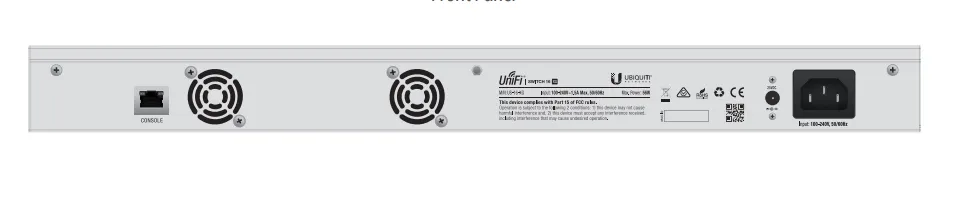
| Console port | RJ-45 |
| Basic switching RJ-45 Ethernet ports type | 10G Ethernet (100/1000/10000) |
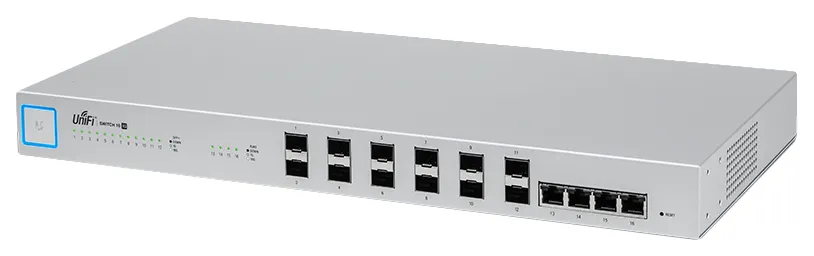
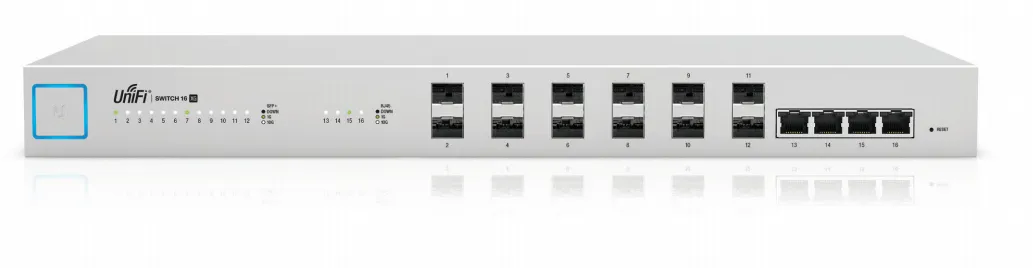
| Basic switching RJ-45 Ethernet ports quantity | 4 |
| SFP+ module slots quantity | 12 |
| Power connector | DC-in jack |
| Weight & dimensions | |
| Weight | 2.62 kg |
| Height | 43 mm |
| Width | 443 mm |
| Depth | 221 mm |
| Energy management | |
| Power consumption (typical) | 36 W |
| Input voltage | 25 - 16 V |
| AC input frequency | 50 - 60 Hz |
| AC input voltage | 100 - 240 V |
| Power consumption (max) | 56 W |
| Power supply included |  |
| Operational conditions | |
| Operating relative humidity (H-H) | 5 - 95% |
| Operating temperature (T-T) | -5 - 40 °C |
| Networking | |
| Full duplex | |
| Networking standards | IEEE 802.1x |
| Port mirroring | |
| Link aggregation | |
| Broadcast storm control | |
| Spanning tree protocol | |
| VLAN support | |
| 10G support | |
| Cable types supported | Cat6 |
| Data transmission | |
| Switching capacity | 320 Gbit/s |
| Jumbo frames support | |
| Forwarding rate | 238.1 Mpps |
| Packaging data | |
| Package type | Box |
| Mounting brackets included | |
| Screws included | |
| Security | |
| Security algorithms | 802.1x RADIUS |
| Certificates | |
| Certification | CE, FCC, IC, ETSI300-019-1.4 |
| Management features | |
| Switch layer | L2 |
| Switch type | Managed |
| Packaging content | |
| Cables included | AC |
| Quick start guide | |
| Design | |
| Rack mounting | |
| Form factor | 1U |
| LED indicators | |
| Product colour | Grey |
| Reset button | |
| Number of fans | 2 fan(s) |
| Housing material | Steel |
| Logistics data | |
| Harmonized System (HS) code | 85176990 |
| EAN | 0810354026010 |
| Warranty | 2 years |
| Source: Icecat.biz | |
10G Aggregation Switch for Enterprise Networks
Build and expand your network with Ubiquiti Networks® UniFi® Switch 16 XG, part of the UniFi Enterprise System. The
US‑16‑XG is a fully managed, 16-port, 10G fiber switch that enhances network capacity by providing high-bandwidth
aggregation connectivity to multiple switches in your network.
The US‑16‑XG offers an extensive suite of advanced Layer-2 switching features and protocols.
Switching Performance
The US‑16‑XG offers the forwarding capacity to simultaneously process traffic on all ports at line rate without any packet loss.
The total non-blocking throughput is up to 160 Gbps.
10G High-Capacity Links
The US‑16‑XG offers maximum performance and low latency as an aggregation switch.
For fiber connectivity, it features 12 SFP+ ports. For copper connectivity, the US‑16‑XG offers four RJ45 ports that
support 10GBASE-T, the standard for 10 Gbps connections using Cat6 (or higher) cabling and RJ45 connectors.
The US‑16‑XG connects to the following:
- Multiple UniFi Switches and a 1G/10G router via SFP+ ports
- VM, Server, NAS, or other network devices via 1G/10G RJ45 ports
UniFi Controller
Designed for convenient management, the UniFi Controller software allows admins to configure and monitor the UniFi Switch and other UniFi devices using a graphical user interface. You can download it from www.ubnt.com at no cost.
Multi-Site Management
A single instance of the UniFi Controller running in the cloud can manage multiple UniFi sites within a centralized interface. Each site is logically separated and has its own network monitoring, configuration, maps, statistics, and admin accounts.
Switch Configuration
You can access any managed UniFi Switch through the UniFi Controller to configure a variety of features:
- Operation mode (switching, mirroring, or aggregate) per port
- Network/VLAN configuration
- Jumbo frame and flow control services
- Network settings
- Storm control setting per port
- Spanning tree configuration
- 802.1x control and RADIUS VLAN
- Debug terminal option for command-line interface
Switch Port Status
You can also view status information for each port:
- Connection speed and duplex mode
- TX/RX data rates
- Network/VLAN setting
Dashboard
The Dashboard tab provides a visual representation of your network’s status. Basic information is provided for each network segment.
Device Configuration
The Devices screen displays the UniFi devices discovered by the UniFi Controller. You can access each managed device for device details and configuration.
Build and expand your network with Ubiquiti Networks® UniFi® Switch 16 XG, part of the UniFi Enterprise System. The
US‑16‑XG is a fully managed, 16-port, 10G fiber switch that enhances network capacity by providing high-bandwidth
aggregation connectivity to multiple switches in your network.
The US‑16‑XG offers an extensive suite of advanced Layer-2 switching features and protocols.
Switching Performance
The US‑16‑XG offers the forwarding capacity to simultaneously process traffic on all ports at line rate without any packet loss.
The total non-blocking throughput is up to 160 Gbps.
10G High-Capacity Links
The US‑16‑XG offers maximum performance and low latency as an aggregation switch.
For fiber connectivity, it features 12 SFP+ ports. For copper connectivity, the US‑16‑XG offers four RJ45 ports that
support 10GBASE-T, the standard for 10 Gbps connections using Cat6 (or higher) cabling and RJ45 connectors.
The US‑16‑XG connects to the following:
- Multiple UniFi Switches and a 1G/10G router via SFP+ ports
- VM, Server, NAS, or other network devices via 1G/10G RJ45 ports
UniFi Controller
Designed for convenient management, the UniFi Controller software allows admins to configure and monitor the UniFi Switch and other UniFi devices using a graphical user interface. You can download it from www.ubnt.com at no cost.
Multi-Site Management
A single instance of the UniFi Controller running in the cloud can manage multiple UniFi sites within a centralized interface. Each site is logically separated and has its own network monitoring, configuration, maps, statistics, and admin accounts.
Switch Configuration
You can access any managed UniFi Switch through the UniFi Controller to configure a variety of features:
- Operation mode (switching, mirroring, or aggregate) per port
- Network/VLAN configuration
- Jumbo frame and flow control services
- Network settings
- Storm control setting per port
- Spanning tree configuration
- 802.1x control and RADIUS VLAN
- Debug terminal option for command-line interface
Switch Port Status
You can also view status information for each port:
- Connection speed and duplex mode
- TX/RX data rates
- Network/VLAN setting
Dashboard
The Dashboard tab provides a visual representation of your network’s status. Basic information is provided for each network segment.
Device Configuration
The Devices screen displays the UniFi devices discovered by the UniFi Controller. You can access each managed device for device details and configuration.
Multitronic Vaasa: 0 pcs
Estimated delivery: No delivery info
Estimated delivery: No delivery info
Today: 11:00 - 15:00
Multitronic Pietarsaari: 0 pcs
Estimated delivery: No delivery info
Estimated delivery: No delivery info
Today: 10:00 - 14:00
Multitronic Jyväskylä: 0 pcs
Estimated delivery: No delivery info
Estimated delivery: No delivery info
Today: Closed
Multitronic Lappeenranta: 0 pcs
Estimated delivery: No delivery info
Estimated delivery: No delivery info
Today: Closed
Multitronic Mariehamn: 0 pcs
Estimated delivery: No delivery info
Estimated delivery: No delivery info
Today: 10:00 - 14:00
- PDF document (English)
The above technical details are for reference only and may change without notice. We reserve the right to correct printing errors and use illustrations for guidance. Some text may be auto-generated or machine-translated, which could lead to inaccuracies.