

No price development information for this product.
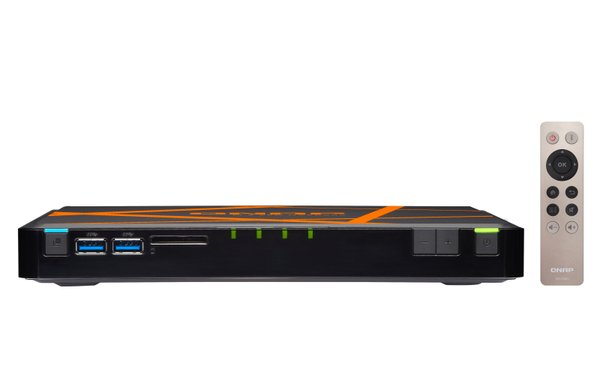
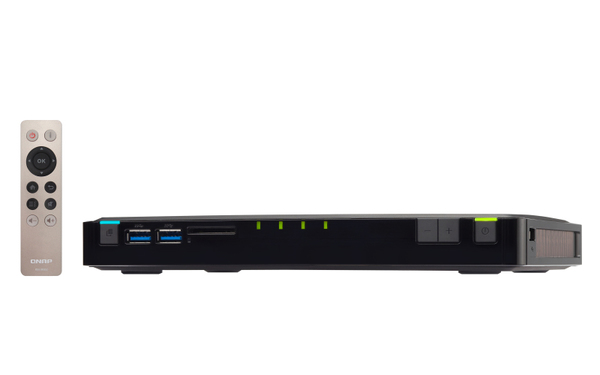
QNAP M.2SATA-NAS, 4xM.2SATA, 2160p, 5xGBLAN, 4GB RAM, svart/orange
Manufacturer: QNAP SYSTEMS
ID: TBS-453A-4G

Product unavailable
This product is end of life or currently not available.
This product is end of life or currently not available.
Key Specifications
Choose one or multiple features to search for items that have the same specifications.
Specifications
Description
Store availability
Delivery
Price development
| Processor | |
| Processor model | N3150 |
| Processor manufacturer | Intel |
| Processor lithography | 14 nm |
| Processor family | Intel Celeron |
| Processor socket | BGA 1170 |
| Stepping | C0 |
| Processor cores | 4 |
| Processor code | SR29F |
| Processor threads | 4 |
| PCI Express slots version | 2.0 |
| Processor operating modes | 64-bit |
| Processor boost frequency | 2.08 GHz |
| On-board graphics card model |  |
| Processor cache | 2 MB |
| CPU configuration (max) | 1 |
| Tjunction | 90 °C |
| PCI Express configurations | 1x4,4x1 |
| Processor frequency | 1.6 GHz |
| Thermal Design Power (TDP) | 6 W |
| Scenario Design Power (SDP) | 4 W |
| Processor codename | Braswell |
| Processor cache type | Smart Cache |
| Processor series | Intel Celeron N3000 series |
| Maximum internal memory supported by processor | 8 GB |
| ECC supported by processor |  |
| Processor package size | 25 x 27 mm |
| Conflict-Free processor | |
| Integrated 4G WiMAX | |
| Memory | |
| Internal memory type | DDR3 |
| Flash memory | 4000 MB |
| Memory slots | 2x SO-DIMM |
| Memory clock speed | 1600 MHz |
| Maximum RAM supported | 8 GB |
| Internal memory | 4 GB |
| Ports & interfaces | |
| USB 2.0 ports quantity | 1 |
| Ethernet LAN (RJ-45) ports | 5 |
| Microphone in | |
| HDMI ports quantity | 2 |
| 3.5 mm (1/8-inch) out | |
| USB 3.2 Gen 1 (3.1 Gen 1) Type-A ports quantity | 4 |
| USB port | |
| Weight & dimensions | |
| Weight | 724 g |
| Height | 25 mm |
| Width | 230 mm |
| Depth | 165 mm |
| Energy management | |
| Power consumption (typical) | 15.2 W |
| Number of power supply units | 1 |
| Output voltage | 10-20 V |
| Power consumption (sleep) | 0.98 W |
| Power supply location | External |
| Operational conditions | |
| Operating relative humidity (H-H) | 5 - 95% |
| Operating temperature (T-T) | 0 - 40 °C |
| Networking | |
| Supported network protocols | CIFS/SMB 3.0, AFP (v3.3), NFS(v3), FTP, FTPS, SFTP, TFTP, HTTP(S), Telnet, SSH, iSCSI, SNMP, SMTP, SMSC |
| Ethernet LAN | |
| Wake-on-LAN ready | |
| Wi-Fi | |
| Jumbo frames support | |
| DHCP client | |
| DHCP server | |
| Ethernet LAN data rates | 10,100,1000 Mbit/s |
| iSCSI support | |
| Dynamic DNS (DDNS) | |
| Storage | |
| RAID levels | 0,1,5,6,10,JBOD |
| Supported file systems | FAT32,HFS+,NTFS, ext3,ext4 |
| RAID support | |
| Number of storage drives supported | 4 |
| Storage drives installed | |
| Installed storage drive type | |
| Supported storage drive types | SSD |
| Hot-swap drive bays | |
| Supported storage drive interfaces | M.2 |
| Online RAID migration | |
| Online RAID expansion | |
| Bad block scan | |
| Operating system/software | |
| Operating system installed | QNAP Turbo System |
| Operating system version | 4.2 |
| Windows operating systems supported | Windows 7,Windows 8 |
| Mac operating systems supported | Mac OS X 10.0 Cheetah, Mac OS X 10.1 Puma, Mac OS X 10.10 Yosemite, Mac OS X 10.11 El Capitan, Mac OS X 10.12 Sierra, Mac OS X 10.13 High Sierra, Mac OS X 10.2 Jaguar, Mac OS X 10.3 Panther, Mac OS X 10.4 Tiger, Mac OS X 10.5 Leopard, Mac OS X 10.6 Snow Leopard, Mac OS X 10.7 Lion, Mac OS X 10.8 Mountain Lion, Mac OS X 10.9 Mavericks |
| Linux operating systems supported | |
| Server operating systems supported | Windows Server 2003,Windows Server 2008 R2,Windows Server 2012,Windows Server 2012 R2 |
| Packaging content | |
| Remote control included | |
| Cables included | AC, LAN (RJ-45) |
| External power adapter | |
| Quick installation guide | |
| Other features | |
| Processor ARK ID | 87258 |
| Design | |
| Chassis type | Compact |
| Cable lock slot | |
| LED indicators | Power, SSD, Status, USB |
| Product colour | Black, Orange |
| Number of built-in speakers | 1 |
| Built-in speaker(s) | |
| Cooling type | Active |
| Cable lock slot type | Kensington |
| Graphics | |
| On-board graphics card base frequency | 320 MHz |
| On-board graphics card burst frequency | 640 MHz |
| Maximum on-board graphics card memory | 8 GB |
| Number of displays supported (on-board graphics) | 3 |
| Processor special features | |
| Intel® Identity Protection Technology (Intel® IPT) | |
| Intel® Anti-Theft Technology (Intel® AT) | |
| Intel® Smart Response Technology | |
| Intel Smart Connect Technology | |
| Intel® Hyper Threading Technology (Intel® HT Technology) | |
| Intel® Turbo Boost Technology | |
| Intel® Quick Sync Video Technology | |
| Intel® InTru™ 3D Technology | |
| Intel® Wireless Display (Intel® WiDi) | |
| Intel® Clear Video HD Technology (Intel® CVT HD) | |
| Intel® Insider™ | |
| Intel® AES New Instructions (Intel® AES-NI) | |
| Enhanced Intel SpeedStep Technology | |
| Execute Disable Bit | |
| Idle States | |
| Thermal Monitoring Technologies | |
| Intel Trusted Execution Technology | |
| Intel Enhanced Halt State | |
| Intel® Clear Video Technology for Mobile Internet Devices (Intel CVT for MID) | |
| Intel VT-x with Extended Page Tables (EPT) | |
| Embedded options available | |
| Intel Rapid Storage Technology | |
| Intel® High Definition Audio (Intel® HD Audio) | |
| Intel® Small Business Advantage (Intel® SBA) | |
| Intel® Secure Key | |
| Intel 64 | |
| Intel Stable Image Platform Program (SIPP) | |
| Intel® OS Guard | |
| UART | |
| Intel Virtualization Technology for Directed I/O (VT-d) | |
| Number of execution units | 12 |
| Maximum number of PCI Express lanes | 4 |
| Intel Secure Boot | |
| Intel Clear Video Technology | |
| Intel Identity Protection Technology version | 1.00 |
| Intel Secure Key Technology version | 1.00 |
| Intel Secure Boot Technology version | 1.00 |
| Intel Small Business Advantage (SBA) version | 0.00 |
| Intel Smart Response Technology version | 0.00 |
| Intel Virtualization Technology (VT-x) | |
| Intel Stable Image Platform Program (SIPP) version | 0.00 |
| Intel Smart Connect Technology version | 0.00 |
| Memory types supported by processor | DDR3L-SDRAM |
| Memory channels supported by processor | Dual |
| Performance | |
| Type | NAS |
| Security algorithms | 256-bit AES, FIPS 140-2,HTTPS, SNMP, SSH |
| Browser supported | Internet Explorer 10+, Firefox 8+, Safari 4+, Chrome |
| Compatible memory cards | SD |
| Noise level | 10.8 dB |
| Snapshot | |
| Card reader integrated | |
| Web-based management | |
| Access Control List (ACL) | |
| Reset button | |
| Multilingual support | |
| On/off switch | |
| S.M.A.R.T. support | |
| Universal Plug and Play (UPnP) | |
| Device class | Small & Medium Business |
| Backup function | |
| Backup features | Cloud, USB drive, iSCSI LUN |
| Backup button | |
| Built-in iTunes server | |
| Built-in FTP server | |
| System log | |
| Hot spare | |
| Password authentication | |
| Share folder | CIFS/SMB 3.0, AFP, FTP |
| Share folder access right management | |
| EAN | 4712511129397 |
| Warranty | 2 years |
Compact, near-silent, and versatile, the 4-bay M.2 SSD NASbook TBS-453A is ideal for office meetings and multimedia applications. Featuring a quad-core Intel® 1.6GHz processor, a built-in 4-port network switch, and using up to 4 M.2 SSDs for storage, the TBS-453A not only provides full-fledged NAS functions with RAID protection, but also can act as a switch and share network access with multiple users regardless of being powered on or off. Coupled with its dual HDMI output and 4K H.264 video display & transcoding abilities, the TBS-453A can easily be carried to meetings to present stored files and quality multimedia content. The TBS-453A also supports the open-source Linux® platform that allows you to directly utilize feature-rich Linux® apps, enjoying a private cloud combining storage and IoT applications.
Handy, quiet and compact with four M.2 SSDs
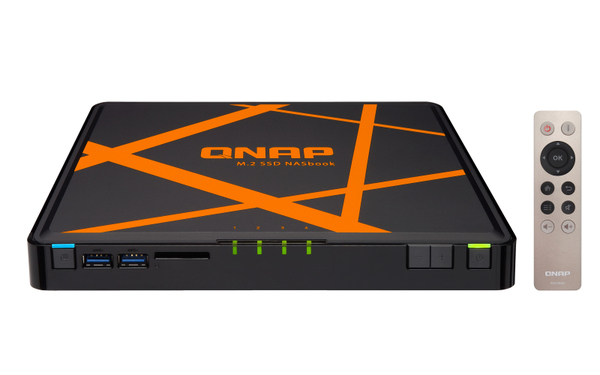
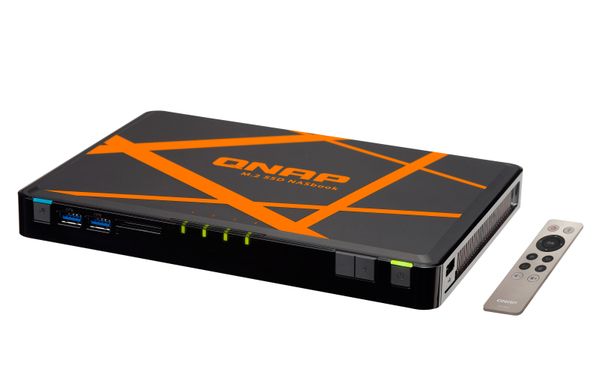
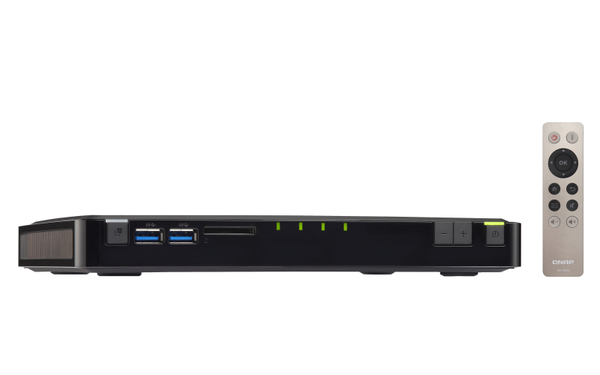
Designed with a "NASbook" concept, the TBS-453A uses a thin, B5-sized case to make it easy to setup anywhere in the office. Compared with a normal NAS, the TBS-453A's usage of M.2 SSDs (instead of conventional hard drives) allows it to be significantly smaller and quieter. The RAM and M.2 SSDs are also easily accessible for installation and upgrading by removing the rubber pads and thumb screws on the bottom of the TBS-453A.
Optimal performance with quad-core CPU, AES-NI hardware-accelerated encryption, and M.2 SSDs
The TBS-453A is powered by an advanced 14nm Intel® Celeron® N3150 quad-core 1.6GHz processor that can automatically burst up to 2.08GHz when performing CPU-intensive tasks. Coupled with dual-channel 4GB/8GB DDR3L-1600 RAM and four M.2 SSDs for storage, the TBS-453A has 2x Gigabit LAN ports and 3x Gigabit switch ports. The built-in 2 Gigabit LAN ports can deliver up to 112MB/s throughput independently for optimizing mission-critical tasks. The TBS-453A features Intel® AES-NI hardware-accelerated encryption. With AES 256-bit encryption for full NAS volumes, the built-in 2 Gigabit LAN ports can deliver up to 109MB/s throughput independently.
Built-in four-port LAN switch for maximized network flexibility
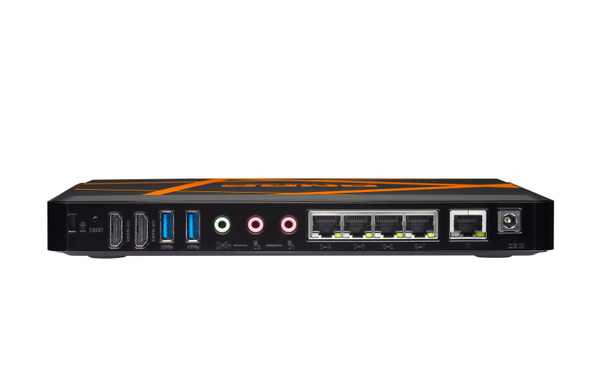
The TBS-453A includes additional hardware-based LAN switch ports with network switch mode and private network mode settings, allowing you to easily build a flexible network environment. In the default switch mode, users can simply use the TBS-453A's network switch functionality to share the Internet and NAS resources at the same time. While in the private network configuration, users can create a closed network, allowing them to create secure environments for activities such as creating a secure surveillance recording with IP cameras. The TBS-453A's network design greatly boosts collaboration and productivity at work as it ensures always-on Internet connectivity. Business meeting attendees, for example, could benefit from the network accessibility to access files stored on the TBS-453A or to search for information online during the meeting.
Dual HDMI output - switch between "duplicated" or "extended" desktop configurations
The TBS-453A supports QNAP’s exclusive QvPC technology and comes with dual HDMI output, enabling you to use the NAS as a PC with a keyboard, mouse and HDMI monitors. You can configure the displayed content on the two monitors in either a “duplicated” or “extended” desktop configuration. Duplicating will display the same content on both displays, and extended allows users to display applications over two displays for improved multitasking convenience and productivity.
The TBS-453A can also be used as an amazing media player by using HD Station to enjoy rich apps including Plex Home Theater, Google Chrome™, Mozilla Firefox®, and more. Alternatively, you can directly use the TBS-453A as a PC by using Linux Station to enjoy the incredibly popular open source Linux® operating system.
Wide range 10V ~ 20V DC input to meet various input voltage requirements
The TBS-453A is provided with a 65W 19V compact AC adapter and supports a DC power supply of 10-20V for maximum flexibility, making it suitable for industrial, factory and other environments that need a wide range of input voltages.
QTS-Linux dual systems for IoT applications
The TBS-453A features QTS-Linux dual systems which build on QNAP's advanced virtualization technologies. The revolutionary architecture of the TBS-453A enables users not only to enjoy the various advanced features introduced in QTS 4.2, download rich apps from QTS App Center but also to develop or utilize IoT packages for Linux® and display them using HDMI output. With the TBS-453A, you can develop and install various IoT packages on demand and centrally store the data on the TBS-453A, benefiting from a secure private storage and development solution. Simply plug in a keyboard, mouse and HDMI monitor to the TBS-453A, and use the Linux Station as if you were using a PC*. You can also operate the Linux Station as a remote desktop via web browser for instant management**.
* To use the Linux Station, you must install it from the App Center.
** The remote desktop function does not support remote audio output.
Storage for hosting virtual machines and containerized applications
Virtualization Station allows you to host virtual machines (VM) on the TBS-453A and access them via a web browser or VNC. Virtualization Station supports multiple operating systems, fast VM creation, VM backup & restoration, VM import/export, snapshot, and Device Management for centrally managing VM. Virtualization Station allows the TBS-453A and VMs to share the same LAN port. No longer constrained by physical network performance, high-speed Virtual Switches greatly increases data transfer between VMs as well as between VMs and NAS through the internal interface. You can also download VMs on demand from online VM markets and import them to the TBS-453A without any complex procedures.
The TBS-453A also features the game-changing container technology for server virtualization with QNAP Container Station. It exclusively integrates LXC and Docker® lightweight virtualization technologies, allowing you to operate multiple isolated Linux® systems on the TBS-453A as well as download apps from the built-in Docker Hub Registry®. Container Station also supports the Online Document app*, which allows you to directly view, edit and store files of various types anytime on your NAS, including Office documents, images and text files.
Comprehensive data recovery with Snapshot, RTRR, and more
The TBS-453A offers various data recovery options. The web-based snapshot tool helps easily backup and restore data on the TBS-453A back to any point of time. You can take up to 1024 snapshots for both volumes and LUN, efficiently replicate volume/LUN snapshots via Snapshot Replica to remote servers by copying only the changes made, and quickly clone a volume /LUN snapshot as a local volume without interrupting the current system operation. Windows users can also directly restore files from snapshots with the Previous Versions feature, saving time and effort without requiring IT support. RTRR (Real-Time Remote Replication) supports real-time or scheduled data backup to a remote QNAP NAS or FTP server and synchronizes files between remote and local folders. You can enjoy backup versioning to preserve a certain amount of versions, with options of simple versioning to schedule how many versions should be retained and for how long, or smart versioning with a rotation scheme that automatically replaces earlier backup versions. The TBS-453A also supports the rsync protocol to back up data to another remote server on a scheduled basis. Data can also be backed up to and restored from a range of cloud storage services, including Amazon® S3, Amazon® Glacier, Microsoft® Azure, ElephantDrive®, Dropbox®, Google Drive™, Google Cloud Storage™, and more.
Cross-platform file sharing, centralized data storage
The TBS-453A supports SMB/CIFS, NFS, and AFP protocols for file sharing across Windows®, Mac®, Linux®/UNIX® networks. Data, logs and ISO images of CDs and DVDs can be centrally stored on the TBS-453A and protected by an integrated antivirus solution. The Windows AD® and LDAP services enable system administrators to configure user permissions by using an existing Windows AD server, LDAP server or built-in LDAP service. The TBS-453A supports SAMBA v4 and can act as a Windows domain controller to manage privilege settings.
Well-rounded backup solutions to secure data
QNAP NetBak Replicator supports real-time and scheduled data backup on Windows including Outlook email archiving. Time Machine® is also supported to provide Mac® OS X users with a solution to effortlessly backup data to the TBS-453A. A wide range of third-party backup software such as Acronis® True Image and Symantec® Backup Exec are also supported.
Enhance productivity with multiple USB 3.0 ports
Direct-attached Storage (DAS) devices such as USB hard drives are incredibly convenient in portability, but they fall short in file sharing and functionality and can only be connected to one server or PC at one time. By connecting a DAS to the TBS-453A you can easily share its content with other users without having to unplug and move it around. The USB ports on the TBS-453A also support devices such as UPS and printers for greater all-round functionality.
Superior real-time and offline 4K video transcoding
Featuring advanced 8th-generation Intel® HD Graphics, the TBS-453A supports 4K (H.264) hardware decoding and delivers superior real-time 4K (H.264) and 1080p video transcoding to convert videos to universal formats that can be smoothly played on PCs, mobile devices and Smart TVs. With offline transcoding, even when you can only connect using a low-speed Internet connection, you can still enjoy smooth video playback using File Station, Video Station, and the Qfile mobile app by selecting a pre-rendered lower resolution video. The TBS-453A also allows you to set a dedicated folder for automatic video transcoding.
Enjoy an immersive karaoke experience with OceanKTV and high-quality audio support
OceanKTV is the world's first NAS-based karaoke application and turns the TBS-453A into a high-quality karaoke system. The TBS-453A comes with two 3.5 mm microphone jacks, a Line out port and by connecting it to an HDMI display and external speaker the TBS-453A provides all you need to start a karaoke party. By installing the OceanKTV mobile app on your tablet, you can also control the entire experience without interrupting anything. More than just a NAS, the TBS-453A is an affordable karaoke machine for singing entertainment.
Qsirch - a smarter, faster way to search
The TBS-453A supports Qsirch, a proprietary near real-time search tool for quick file searching. In addition to thumbnail previews, Qsirch now allows you to find and preview Gmail emails that are backed up on the TBS-453A. Qsirch even remembers your search history allowing you to quickly navigate to files you've previously searched for. Qsirch is a huge productivity boost that greatly reduces the time spent looking for files on the NAS, allowing you to focus on other tasks. The revamped Qsirch 2.1 adds a Google Chrome Extension™ that allows you to search for files on your NAS when you use Google Search™.
Comprehensive security options
In open network environments, business data may be exposed to a potential hack. The TBS-453A provides numerous security options, such as 2-step verification, encrypted access, IP blocking, and more. IT administrators can also control the access rights of each user to different folders, preventing unauthorized access to important files. The TBS-453A supports AES 256-bit encryption, preventing sensitive business data from unauthorized access and breach even if the hard drives or the entire system were stolen. For added convenience, users can store the decryption key on a USB drive for automatic unlocking when the NAS is started.
Comprehensive surveillance solution providing 24/7 security
Surveillance Station is a professional network surveillance Video Management System (VMS) that offers a user-friendly management interface, over 3,000 compatible IP camera models, and expandable IP camera channel licenses. It supports real-time monitoring, video & audio recording and playback with a wide range of customizable settings. You can also install the Vmobile app on your iOS® or Android™ devices to manage monitored channels anytime and anywhere to safeguard your office environment, or install the Vcam mobile app to turn your device into a network camera to instantly record to your TBS-453A. The TBS-453A includes 4 free IP camera channels and you can expand up to 40 channels by purchasing additional licenses.
Install-on-demand apps to extend NAS functionality
The built-in App Center provides various install-on-demand apps developed by QNAP and third-party developers, including tools for backup/sync, business, content management, communications, download, entertainment, and much more. It is also a centralized location for managing & updating installed apps once newer versions are released, adding potentially limitless opportunities for the TBS-453A.
LED indicators with adjustable brightness controls
With adjustable 20-stage brightness controls for LED indicators, the TBS-453A provides flexible LED brightness options. Based on the surrounding environment, you can adjust the brightness of all system indicators and also schedule the system to automatically dim the LEDs at certain times when needed.
Easily expand storage capacity with up to 8 hard drives
The TBS-453A supports online capacity expansion for archiving rapidly-growing data by connecting a QNAP expansion enclosure. With the QNAP scale-up solution, the raw storage capacity can be expanded on demand*, making the TBS-453A an ideal file center with large storage capacity for storage-intensive business applications such as video surveillance, data archiving, TV broadcast storage, and more.
With the support of QJBOD Express (JBOD enclosures roaming)**, you can simply connect a large capacity QNAP expansion enclosure to the TBS-453A, and migrate data to another NAS through the JBOD enclosure without requiring network connectivity.
*To expand the storage space with an UX expansion enclosure, you must create a separate static volume or storage pool on the UX expansion unit.
**RAID groups of storage pools cannot cross multiple enclosures.
- Built-in 4-port LAN switch, combined with advanced virtual switch functionality for maximized network flexibility
- Dual HDMI output with duplicated and extended desktop options
- Use the TBS-453A as a PC with exclusive QvPC Technology and 4K (H.264) support
- Supports Linux® OS with direct output via HDMI
- Store, backup, and share files with snapshots and versioning
- Wide range 10V ~ 20V DC power input
- Expand the total raw storage capacity with a UX-800P/UX-500P expansion enclosure
- Build a karaoke system with the OceanKTV app
Handy, quiet and compact with four M.2 SSDs
Designed with a "NASbook" concept, the TBS-453A uses a thin, B5-sized case to make it easy to setup anywhere in the office. Compared with a normal NAS, the TBS-453A's usage of M.2 SSDs (instead of conventional hard drives) allows it to be significantly smaller and quieter. The RAM and M.2 SSDs are also easily accessible for installation and upgrading by removing the rubber pads and thumb screws on the bottom of the TBS-453A.
Optimal performance with quad-core CPU, AES-NI hardware-accelerated encryption, and M.2 SSDs
The TBS-453A is powered by an advanced 14nm Intel® Celeron® N3150 quad-core 1.6GHz processor that can automatically burst up to 2.08GHz when performing CPU-intensive tasks. Coupled with dual-channel 4GB/8GB DDR3L-1600 RAM and four M.2 SSDs for storage, the TBS-453A has 2x Gigabit LAN ports and 3x Gigabit switch ports. The built-in 2 Gigabit LAN ports can deliver up to 112MB/s throughput independently for optimizing mission-critical tasks. The TBS-453A features Intel® AES-NI hardware-accelerated encryption. With AES 256-bit encryption for full NAS volumes, the built-in 2 Gigabit LAN ports can deliver up to 109MB/s throughput independently.
Built-in four-port LAN switch for maximized network flexibility
The TBS-453A includes additional hardware-based LAN switch ports with network switch mode and private network mode settings, allowing you to easily build a flexible network environment. In the default switch mode, users can simply use the TBS-453A's network switch functionality to share the Internet and NAS resources at the same time. While in the private network configuration, users can create a closed network, allowing them to create secure environments for activities such as creating a secure surveillance recording with IP cameras. The TBS-453A's network design greatly boosts collaboration and productivity at work as it ensures always-on Internet connectivity. Business meeting attendees, for example, could benefit from the network accessibility to access files stored on the TBS-453A or to search for information online during the meeting.
Dual HDMI output - switch between "duplicated" or "extended" desktop configurations
The TBS-453A supports QNAP’s exclusive QvPC technology and comes with dual HDMI output, enabling you to use the NAS as a PC with a keyboard, mouse and HDMI monitors. You can configure the displayed content on the two monitors in either a “duplicated” or “extended” desktop configuration. Duplicating will display the same content on both displays, and extended allows users to display applications over two displays for improved multitasking convenience and productivity.
The TBS-453A can also be used as an amazing media player by using HD Station to enjoy rich apps including Plex Home Theater, Google Chrome™, Mozilla Firefox®, and more. Alternatively, you can directly use the TBS-453A as a PC by using Linux Station to enjoy the incredibly popular open source Linux® operating system.
Wide range 10V ~ 20V DC input to meet various input voltage requirements
The TBS-453A is provided with a 65W 19V compact AC adapter and supports a DC power supply of 10-20V for maximum flexibility, making it suitable for industrial, factory and other environments that need a wide range of input voltages.
QTS-Linux dual systems for IoT applications
The TBS-453A features QTS-Linux dual systems which build on QNAP's advanced virtualization technologies. The revolutionary architecture of the TBS-453A enables users not only to enjoy the various advanced features introduced in QTS 4.2, download rich apps from QTS App Center but also to develop or utilize IoT packages for Linux® and display them using HDMI output. With the TBS-453A, you can develop and install various IoT packages on demand and centrally store the data on the TBS-453A, benefiting from a secure private storage and development solution. Simply plug in a keyboard, mouse and HDMI monitor to the TBS-453A, and use the Linux Station as if you were using a PC*. You can also operate the Linux Station as a remote desktop via web browser for instant management**.
* To use the Linux Station, you must install it from the App Center.
** The remote desktop function does not support remote audio output.
Storage for hosting virtual machines and containerized applications
Virtualization Station allows you to host virtual machines (VM) on the TBS-453A and access them via a web browser or VNC. Virtualization Station supports multiple operating systems, fast VM creation, VM backup & restoration, VM import/export, snapshot, and Device Management for centrally managing VM. Virtualization Station allows the TBS-453A and VMs to share the same LAN port. No longer constrained by physical network performance, high-speed Virtual Switches greatly increases data transfer between VMs as well as between VMs and NAS through the internal interface. You can also download VMs on demand from online VM markets and import them to the TBS-453A without any complex procedures.
The TBS-453A also features the game-changing container technology for server virtualization with QNAP Container Station. It exclusively integrates LXC and Docker® lightweight virtualization technologies, allowing you to operate multiple isolated Linux® systems on the TBS-453A as well as download apps from the built-in Docker Hub Registry®. Container Station also supports the Online Document app*, which allows you to directly view, edit and store files of various types anytime on your NAS, including Office documents, images and text files.
Comprehensive data recovery with Snapshot, RTRR, and more
The TBS-453A offers various data recovery options. The web-based snapshot tool helps easily backup and restore data on the TBS-453A back to any point of time. You can take up to 1024 snapshots for both volumes and LUN, efficiently replicate volume/LUN snapshots via Snapshot Replica to remote servers by copying only the changes made, and quickly clone a volume /LUN snapshot as a local volume without interrupting the current system operation. Windows users can also directly restore files from snapshots with the Previous Versions feature, saving time and effort without requiring IT support. RTRR (Real-Time Remote Replication) supports real-time or scheduled data backup to a remote QNAP NAS or FTP server and synchronizes files between remote and local folders. You can enjoy backup versioning to preserve a certain amount of versions, with options of simple versioning to schedule how many versions should be retained and for how long, or smart versioning with a rotation scheme that automatically replaces earlier backup versions. The TBS-453A also supports the rsync protocol to back up data to another remote server on a scheduled basis. Data can also be backed up to and restored from a range of cloud storage services, including Amazon® S3, Amazon® Glacier, Microsoft® Azure, ElephantDrive®, Dropbox®, Google Drive™, Google Cloud Storage™, and more.
Cross-platform file sharing, centralized data storage
The TBS-453A supports SMB/CIFS, NFS, and AFP protocols for file sharing across Windows®, Mac®, Linux®/UNIX® networks. Data, logs and ISO images of CDs and DVDs can be centrally stored on the TBS-453A and protected by an integrated antivirus solution. The Windows AD® and LDAP services enable system administrators to configure user permissions by using an existing Windows AD server, LDAP server or built-in LDAP service. The TBS-453A supports SAMBA v4 and can act as a Windows domain controller to manage privilege settings.
Well-rounded backup solutions to secure data
QNAP NetBak Replicator supports real-time and scheduled data backup on Windows including Outlook email archiving. Time Machine® is also supported to provide Mac® OS X users with a solution to effortlessly backup data to the TBS-453A. A wide range of third-party backup software such as Acronis® True Image and Symantec® Backup Exec are also supported.
Enhance productivity with multiple USB 3.0 ports
Direct-attached Storage (DAS) devices such as USB hard drives are incredibly convenient in portability, but they fall short in file sharing and functionality and can only be connected to one server or PC at one time. By connecting a DAS to the TBS-453A you can easily share its content with other users without having to unplug and move it around. The USB ports on the TBS-453A also support devices such as UPS and printers for greater all-round functionality.
Superior real-time and offline 4K video transcoding
Featuring advanced 8th-generation Intel® HD Graphics, the TBS-453A supports 4K (H.264) hardware decoding and delivers superior real-time 4K (H.264) and 1080p video transcoding to convert videos to universal formats that can be smoothly played on PCs, mobile devices and Smart TVs. With offline transcoding, even when you can only connect using a low-speed Internet connection, you can still enjoy smooth video playback using File Station, Video Station, and the Qfile mobile app by selecting a pre-rendered lower resolution video. The TBS-453A also allows you to set a dedicated folder for automatic video transcoding.
Enjoy an immersive karaoke experience with OceanKTV and high-quality audio support
OceanKTV is the world's first NAS-based karaoke application and turns the TBS-453A into a high-quality karaoke system. The TBS-453A comes with two 3.5 mm microphone jacks, a Line out port and by connecting it to an HDMI display and external speaker the TBS-453A provides all you need to start a karaoke party. By installing the OceanKTV mobile app on your tablet, you can also control the entire experience without interrupting anything. More than just a NAS, the TBS-453A is an affordable karaoke machine for singing entertainment.
Qsirch - a smarter, faster way to search
The TBS-453A supports Qsirch, a proprietary near real-time search tool for quick file searching. In addition to thumbnail previews, Qsirch now allows you to find and preview Gmail emails that are backed up on the TBS-453A. Qsirch even remembers your search history allowing you to quickly navigate to files you've previously searched for. Qsirch is a huge productivity boost that greatly reduces the time spent looking for files on the NAS, allowing you to focus on other tasks. The revamped Qsirch 2.1 adds a Google Chrome Extension™ that allows you to search for files on your NAS when you use Google Search™.
Comprehensive security options
In open network environments, business data may be exposed to a potential hack. The TBS-453A provides numerous security options, such as 2-step verification, encrypted access, IP blocking, and more. IT administrators can also control the access rights of each user to different folders, preventing unauthorized access to important files. The TBS-453A supports AES 256-bit encryption, preventing sensitive business data from unauthorized access and breach even if the hard drives or the entire system were stolen. For added convenience, users can store the decryption key on a USB drive for automatic unlocking when the NAS is started.
Comprehensive surveillance solution providing 24/7 security
Surveillance Station is a professional network surveillance Video Management System (VMS) that offers a user-friendly management interface, over 3,000 compatible IP camera models, and expandable IP camera channel licenses. It supports real-time monitoring, video & audio recording and playback with a wide range of customizable settings. You can also install the Vmobile app on your iOS® or Android™ devices to manage monitored channels anytime and anywhere to safeguard your office environment, or install the Vcam mobile app to turn your device into a network camera to instantly record to your TBS-453A. The TBS-453A includes 4 free IP camera channels and you can expand up to 40 channels by purchasing additional licenses.
Install-on-demand apps to extend NAS functionality
The built-in App Center provides various install-on-demand apps developed by QNAP and third-party developers, including tools for backup/sync, business, content management, communications, download, entertainment, and much more. It is also a centralized location for managing & updating installed apps once newer versions are released, adding potentially limitless opportunities for the TBS-453A.
LED indicators with adjustable brightness controls
With adjustable 20-stage brightness controls for LED indicators, the TBS-453A provides flexible LED brightness options. Based on the surrounding environment, you can adjust the brightness of all system indicators and also schedule the system to automatically dim the LEDs at certain times when needed.
Easily expand storage capacity with up to 8 hard drives
The TBS-453A supports online capacity expansion for archiving rapidly-growing data by connecting a QNAP expansion enclosure. With the QNAP scale-up solution, the raw storage capacity can be expanded on demand*, making the TBS-453A an ideal file center with large storage capacity for storage-intensive business applications such as video surveillance, data archiving, TV broadcast storage, and more.
With the support of QJBOD Express (JBOD enclosures roaming)**, you can simply connect a large capacity QNAP expansion enclosure to the TBS-453A, and migrate data to another NAS through the JBOD enclosure without requiring network connectivity.
*To expand the storage space with an UX expansion enclosure, you must create a separate static volume or storage pool on the UX expansion unit.
**RAID groups of storage pools cannot cross multiple enclosures.
- Built-in 4-port LAN switch, combined with advanced virtual switch functionality for maximized network flexibility
- Dual HDMI output with duplicated and extended desktop options
- Use the TBS-453A as a PC with exclusive QvPC Technology and 4K (H.264) support
- Supports Linux® OS with direct output via HDMI
- Store, backup, and share files with snapshots and versioning
- Wide range 10V ~ 20V DC power input
- Expand the total raw storage capacity with a UX-800P/UX-500P expansion enclosure
- Build a karaoke system with the OceanKTV app
Multitronic Vaasa: 0 pcs
Estimated delivery: No delivery info
Estimated delivery: No delivery info
Today: 10:00 - 18:00
Multitronic Pietarsaari: 0 pcs
Estimated delivery: No delivery info
Estimated delivery: No delivery info
Today: 09:00 - 17:00
Multitronic Jyväskylä: 0 pcs
Estimated delivery: No delivery info
Estimated delivery: No delivery info
Today: 10:00 - 17:00
Multitronic Lappeenranta: 0 pcs
Estimated delivery: No delivery info
Estimated delivery: No delivery info
Today: 10:00 - 18:00
Multitronic Mariehamn: 0 pcs
Estimated delivery: No delivery info
Estimated delivery: No delivery info
Today: 10:00 - 17:00
The above technical details are for reference only and may change without notice. We reserve the right to correct printing errors and use illustrations for guidance. Some text may be auto-generated or machine-translated, which could lead to inaccuracies.