

No price development information for this product.
Product unavailable
This product is end of life or currently not available.
This product is end of life or currently not available.
Specifications
Description
Store availability
Delivery
Price development
| Hard drive | |
| Device type | HDD |
| System requirements | |
| Compatible operating systems | 32bit: Windows® (Vista/7/8, 8.1/10) 64bit: Windows® (Vista/7/8, 8.1/10) Mac (OS X 10.7.5-10.11) |
| Weight & dimensions | |
| Weight | 121.1 kg |
| Height | 983 mm |
| Width | 1168.4 mm |
| Depth | 1592.6 mm |
| Media formats | |
| ISO A-series sizes (A0...A9) | A0,A1 |
| ISO B-series sizes (B0...B9) | B2 |
| Print technology | |
| Colour |  |
| Maximum resolution | 2400 x 1200 DPI |
| Print technology | Inkjet |
| Number of print cartridges | 1 |
| Print head | PF-10 |
| Scanning | |
| Scanning | N |
| Copying | |
| Copying |  |
| Energy management | |
| Power supply | 100 W |
| Power consumption (off) | 0.5 W |
| Power consumption (standby) | 3.6 W |
| Operational conditions | |
| Operating relative humidity (H-H) | 10 - 80% |
| Storage temperature (T-T) | 15 - 30 °C |
| Networking | |
| Ethernet LAN | |
| Ethernet interface type | Gigabit Ethernet |
| Sound emission | |
| Printing noise level | 49 dB |
| Paper handling | |
| Maximum print size | A0 (841 x 1189 mm) |
| Media thickness | 0.07 - 0.8 mm |
| Roll external diameter | 17 cm |
| Roll paper | |
| Packaging content | |
| Bundled software | imagePROGRAF Printer Driver, Quick Utility Toolbox, Accounting Manager, Device Management Console, Media Configuration Tool, PosterArtist Lite (PC only), Printer Driver Extra Kit (Free Layout and Advanced Preview), Print Plug-in for Microsoft Word/Excel/PowerPoint (PC only), Gallery Wrap Feature |
| Performance | |
| Drive capacity | 320 GB |
| EAN | 4549292056754 |
| Warranty | 1 year |
| Source: Icecat.biz | |
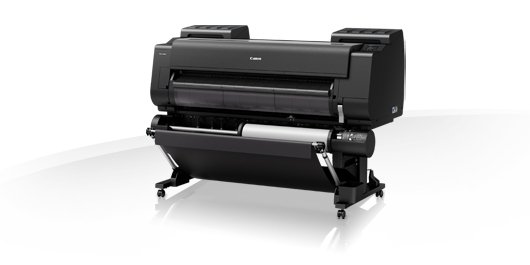
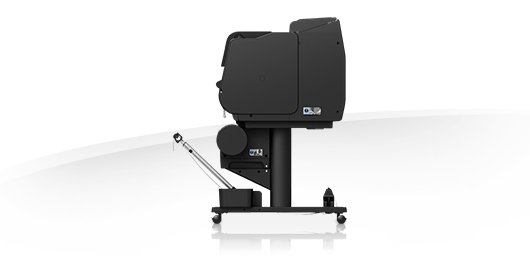
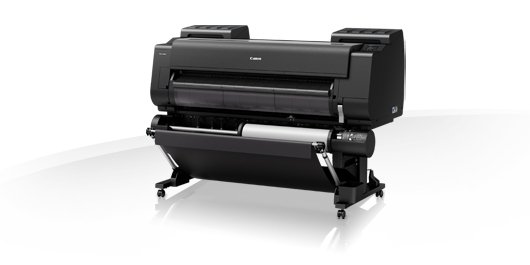
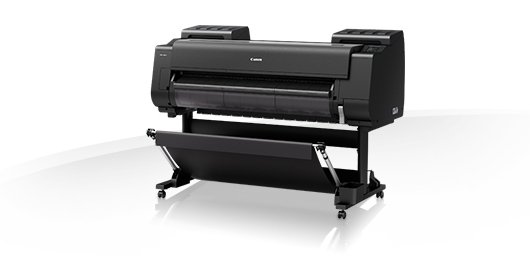
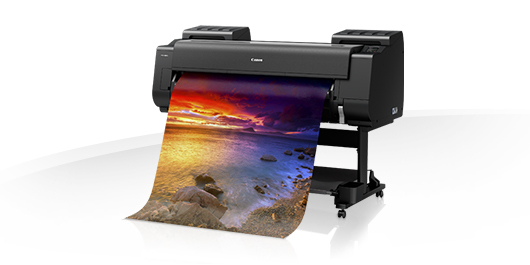
The 8-color 44-inch imagePROGRAF PRO-4000S printer designed for the poster and signage markets exceeds expectations for speed and color consistency in a large format production printer. The use of a new 1.28-inch wide 12-channel integrated compact print head, LUCIA PRO ink set , a high-precision mechanical platform and the L-COA PRO high-speed image processing engine achieves a balance between high-speed printing and exceptional print quality.
The new LUCIA PRO ink set adopts newly formulated 8-color microencapsulated pigment inks. These inks help you achieve fantastic color reproduction, image clarity, and fine lines ideal for creating vivid posters and advertising displays.
- This new ink set helps:
- Enhance red color performance
- Reduce graininess
- Enhance dark area reproduction
PF-10 Print Head
The PF-10, a 1.28”-wide print head with 18,432 nozzles equipped with anti-clogging FINE technology generates fast print speeds while reducing the possibility of clogging. Ink ejection conditions are precisely checked by 27 sensors, and if a clog is detected, another nozzle will automatically provide back-up.
To enhance print performance, the 8-colors utilize all 12 ink channels in the print head. The LUCIA PRO ink is arranged in a mirror layout on the print head, symmetrically arranging the most important colors: C, M, Y, and MBK. This layout allows for the same ejection order of the four key colors during the bidirectional printing process resulting in denser ink placement and faster prints speeds.
This new print head is wider than previous imagePROGRAF print heads requiring models to only have one instead of two. Having only one print head means a more compact printer that achieves faster print speeds while maintaining high print quality.
L-COA PRO High-Speed Image Processing Engine
The imagePROGRAF printers are powered by the L-COA PRO high-speed image processing engine. With three new processing chips, this high-precision control engine performs the processing of massive image data, and controls the optimal ink layout that produces high resolution prints.
Color Calibration
The color calibration function is designed to produce consistent color reproduction. This new printer includes an upgraded, built-in color densitometer that offers precise calibration and color matching. Using a three-color LED and newly developed condenser lens the sensor enables accurate recalibration of the device, allowing you to maintain a low average printer-to-printer color difference. The color calibration is finished quickly after a few simple steps on the printer’s operation panel. A single color calibration performed with one type of media can be applied to media in all printing modes.
Device Management Console
The Device Management Console software, ideal for fleet management, lets you perform color calibrations remotely. This software lets you monitor the printer status of up to 50 units from any location in the world, be notified via email when an error has occurred, or check the amount of ink left in the printers without ever having to leave the comfort of your desk.
The new LUCIA PRO ink set adopts newly formulated 8-color microencapsulated pigment inks. These inks help you achieve fantastic color reproduction, image clarity, and fine lines ideal for creating vivid posters and advertising displays.
- This new ink set helps:
- Enhance red color performance
- Reduce graininess
- Enhance dark area reproduction
PF-10 Print Head
The PF-10, a 1.28”-wide print head with 18,432 nozzles equipped with anti-clogging FINE technology generates fast print speeds while reducing the possibility of clogging. Ink ejection conditions are precisely checked by 27 sensors, and if a clog is detected, another nozzle will automatically provide back-up.
To enhance print performance, the 8-colors utilize all 12 ink channels in the print head. The LUCIA PRO ink is arranged in a mirror layout on the print head, symmetrically arranging the most important colors: C, M, Y, and MBK. This layout allows for the same ejection order of the four key colors during the bidirectional printing process resulting in denser ink placement and faster prints speeds.
This new print head is wider than previous imagePROGRAF print heads requiring models to only have one instead of two. Having only one print head means a more compact printer that achieves faster print speeds while maintaining high print quality.
L-COA PRO High-Speed Image Processing Engine
The imagePROGRAF printers are powered by the L-COA PRO high-speed image processing engine. With three new processing chips, this high-precision control engine performs the processing of massive image data, and controls the optimal ink layout that produces high resolution prints.
Color Calibration
The color calibration function is designed to produce consistent color reproduction. This new printer includes an upgraded, built-in color densitometer that offers precise calibration and color matching. Using a three-color LED and newly developed condenser lens the sensor enables accurate recalibration of the device, allowing you to maintain a low average printer-to-printer color difference. The color calibration is finished quickly after a few simple steps on the printer’s operation panel. A single color calibration performed with one type of media can be applied to media in all printing modes.
Device Management Console
The Device Management Console software, ideal for fleet management, lets you perform color calibrations remotely. This software lets you monitor the printer status of up to 50 units from any location in the world, be notified via email when an error has occurred, or check the amount of ink left in the printers without ever having to leave the comfort of your desk.
Multitronic Vaasa: 0 pcs
Estimated delivery: No delivery info
Estimated delivery: No delivery info
Today: 10:00 - 18:00
Multitronic Pietarsaari: 0 pcs
Estimated delivery: No delivery info
Estimated delivery: No delivery info
Today: 09:00 - 17:00
Multitronic Jyväskylä: 0 pcs
Estimated delivery: No delivery info
Estimated delivery: No delivery info
Today: 10:00 - 17:00
Multitronic Lappeenranta: 0 pcs
Estimated delivery: No delivery info
Estimated delivery: No delivery info
Today: 10:00 - 18:00
Multitronic Mariehamn: 0 pcs
Estimated delivery: No delivery info
Estimated delivery: No delivery info
Today: 10:00 - 18:00
The above technical details are for reference only and may change without notice. We reserve the right to correct printing errors and use illustrations for guidance. Some text may be auto-generated or machine-translated, which could lead to inaccuracies.