

No price development information for this product.
Product unavailable
This product is end of life or currently not available.
This product is end of life or currently not available.
Key Specifications
Choose one or multiple features to search for items that have the same specifications.
Specifications
Description
Store availability
Delivery
Price development
| System requirements | |
| Windows operating systems supported | Windows 10 Education, Windows 10 Education x64,Windows 10 Enterprise, Windows 10 Enterprise x64,Windows 10 Home, Windows 10 Home x64,Windows 10 Pro, Windows 10 Pro x64,Windows 7 Enterprise, Windows 7 Enterprise x64,Windows 7 Home Basic, Windows 7 Home Basic x64,Windows 7 Home Premium, Windows 7 Home Premium x64,Windows 7 Professional, Windows 7 Professional x64,Windows 7 Starter, Windows 7 Starter x64,Windows 7 Ultimate, Windows 7 Ultimate x64,Windows 8,Windows 8 Enterprise, Windows 8 Enterprise x64,Windows 8 Pro, Windows 8 Pro x64,Windows 8 x64,Windows 8.1,Windows 8.1 Enterprise, Windows 8.1 Enterprise x64,Windows 8.1 Pro, Windows 8.1 Pro x64,Windows 8.1 x64,Windows Vista Business, Windows Vista Business x64,Windows Vista Enterprise, Windows Vista Enterprise x64,Windows Vista Home Basic, Windows Vista Home Basic x64,Windows Vista Home Premium, Windows Vista Home Premium x64,Windows Vista Ultimate, Windows Vista Ultimate x64 |
| Mac operating systems supported | Mac OS X 10.10 Yosemite, Mac OS X 10.11 El Capitan, Mac OS X 10.8 Mountain Lion, Mac OS X 10.9 Mavericks |
| Server operating systems supported | Windows Server 2008,Windows Server 2008 R2,Windows Server 2008 R2 x64,Windows Server 2008 x64,Windows Server 2012,Windows Server 2012 R2,Windows Server 2012 R2 x64,Windows Server 2012 x64 |
| Ports & interfaces | |
| Optional connectivity | Wireless LAN |
| USB 2.0 ports quantity | 2 |
| Standard interfaces | RJ-45,USB, USB 2.0 |
| Weight & dimensions | |
| Weight | 24 kg |
| Height | 279 mm |
| Width | 427 mm |
| Depth | 571 mm |
| Printing | |
| Colour |  |
| Maximum resolution | 1200 x 1200 DPI |
| Print technology | LED |
| Print resolution colour | 1200 x 1200 DPI |
| Print speed (black, normal quality, A4/US Letter) | 30 ppm |
| Warm-up time | 27 s |
| Time to first page (colour, normal) | 7.5 s |
| Time to first page (black, normal) | 7.5 s |
| Duplex printing | |
| Secure printing | |
| Energy management | |
| Power consumption (PowerSave) | 14 W |
| Power consumption (printing) | 670 W |
| AC input frequency | 50/60 Hz |
| AC input voltage | 220 - 240 V |
| Power consumption (max) | 1250 W |
| Operational conditions | |
| Operating relative humidity (H-H) | 20 - 80% |
| Storage temperature (T-T) | -10 - 43 °C |
| Operating temperature (T-T) | 10 - 32 °C |
| Storage relative humidity (H-H) | 10 - 90% |
| Networking | |
| Security algorithms | HTTPS, IPSEC, SNMP, SSL/TLS |
| Ethernet LAN | |
| Wi-Fi |  |
| Mobile printing technologies | Apple AirPrint, Google Cloud Print |
| Paper handling | |
| Photo paper sizes (imperial) | 4x6,5x7" |
| Envelopes sizes | 9,10,C5,DL, Monarch |
| ISO A-series sizes (A0...A9) | A4,A5,A6 |
| ISO B-series sizes (B0...B9) | B5,B6 |
| Multi-purpose tray media types | Envelopes |
| Maximum ISO A-series paper size | A4 |
| Packaging content | |
| Manual | |
| Power cord included | |
| Cartridge(s) included | |
| Other features | |
| Supported protocols | CP/IPv4&v6, NetBIOS over TCP, DHCP, DHCPv6, BOOTP, HTTP, HTTPS, DNS, DDNS, WINS, UPNP, Bonjour, SMTP, POP3, SNMPv1&v3, SNTP, IPP, IPPS, WSD Print, LLTD, IEEE802.1X, LPR, Port9100, Telnet, FTP, Google Cloud Print, Wireless IEEE802.11a/b/g/n, WEP, WPA, WPA2, Personal, Enterprise |
| Design | |
| Display | LCD |
| Display diagonal | 17.8 cm (7") |
| Product colour | Black, White |
| Control type | Touch |
| Touchscreen | |
| Built-in display | |
| Performance | |
| Internal memory | 1000 MB |
| Noise level (idle) | 37 dB |
| Features | |
| Number of print cartridges | 4 |
| Maximum duty cycle | 60000 pages per month |
| Printing colours | Black, Cyan, Magenta, Yellow |
| Recommended duty cycle | 0 - 6000 pages per month |
| Input & output capacity | |
| Maximum output capacity | 150 sheets |
| Maximum input capacity | 1410 sheets |
| Multi-Purpose tray input capacity | 100 sheets |
| Paper input type | Paper tray |
| EAN | 5031713067283 |
| Warranty | 1 year |
| Source: Icecat.biz | |
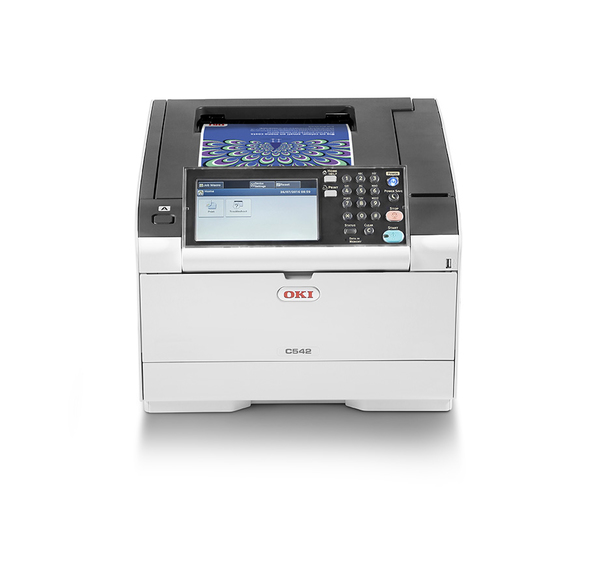
The C542dn puts the transforming benefits of smart printers within reach. Incorporating a customisable 7” colour LCD touch screen and OKI’s smart extendable platform (sXP) which provides connectivity into a pull printing fleet.
Productivity and connectivity
Keeping productivity high and seamlessly connected
Important security features
Keep documents confidential and access stored print jobs when required
smart Extendable Platform (sXP)
Allows for connectivity to pull printing fleet and other devices
Simple to set-up, use and own
Low power consumption and duplex printing as standard
Small businesses and workgroups can now enjoy the transforming benefits of smart printers. The C542dn is ultra-fast, powerful and equipped with the latest security features, incorporating 7" colour LCD touch screen technology and OKI’s open architecture smart extendable platform (sXP) which provides exceptional potential for connectivity and customisation. A wide range of media compatibility, intuitive storage and easy updates make the C542dn a perfect fit for any small business.
Productivity and connectivity - Keeping productivity high and seamlessly connected
With print speeds of 30ppm in colour and 1GB RAM memory ensures busy workgroups get fast results, helping them keep productive. Gigabit Ethernet, optional Wireless LAN and printing directly from smartphones or tablets improves connectivity options.
- Impressive print speeds of 30ppm in colour
- 1GB RAM memory for trouble-free printing of graphics-intensive documents
- Gigabit Ethernet enables fast transfer of large colour files across the network
- Store templates and documents on the device for all users to print without authentication (Shared Print)
- Mobile printing from smartphones and tablets, Google Cloud Print 2.0 ready, as well as being compatible with AirPrint by Apple Inc.
- Wireless Direct feature offers safe simultaneous connection of wired and wireless networking
- Optional Wireless LAN Module available
Important security features - Keep documents confidential and access stored print jobs when required
Helping businesses to stay in control of printing output and cost, the C542dn includes a wide range of cost and time-saving features.
- Keep documents confidential with Private Print and optional Card Release, so users can view all print jobs before selecting which ones to print
- Internet Protocol Security (IPSec) compliance, ensuring securing that documents are safely sent and received
smart Extendable Platform (sXP) – Allows for connectivity to pull printing fleet and other devices
The C542dn gives businesses access to a wide range of new features. Connecting to existing pull printing fleets and third-party IT applications is simple, bringing the power of smart technology to any workgroup.
- OKI's open architecture sXP for workflow integration and document management
- Intuitive, customisable 7” colour LCD touch screen
- Potential to run third-party applications on the device, such as PaperCut MF and Drivve Image
- Access to document management software SENDYS Explorer LITE at no extra cost
- SENDYS Output Manager option, allowing administrator to manager all users’ print jobs, reducing costs and environmental impact
- Software development kit (SDK) available for rapid implementation of a custom solution
Simple to set-up, use and own - Low power consumption and duplex printing as standard
The C542dn is easy to set-up and use with a range of eco-friendly features that save energy and help to lower running costs, including duplex printing as standard.
- Video guidance for installation and changing consumables
- When new features are available you can update the device via the OKI portal
- Trouble-shooting on the device screen and via OKI Mobile Print app
- Quiet mode ideal for smaller offices
- Deep Sleep mode saves energy, Auto-Off mode automatically powers down to less than 0.5W when not in use
- Toner Save to reduce costs, when printing draft or internal documents
- Duplex printing reduces paper usage
- LED technology means no moving parts for a longer life
- Free consumables recycling programme
Productivity and connectivity
Keeping productivity high and seamlessly connected
Important security features
Keep documents confidential and access stored print jobs when required
smart Extendable Platform (sXP)
Allows for connectivity to pull printing fleet and other devices
Simple to set-up, use and own
Low power consumption and duplex printing as standard
Small businesses and workgroups can now enjoy the transforming benefits of smart printers. The C542dn is ultra-fast, powerful and equipped with the latest security features, incorporating 7" colour LCD touch screen technology and OKI’s open architecture smart extendable platform (sXP) which provides exceptional potential for connectivity and customisation. A wide range of media compatibility, intuitive storage and easy updates make the C542dn a perfect fit for any small business.
Productivity and connectivity - Keeping productivity high and seamlessly connected
With print speeds of 30ppm in colour and 1GB RAM memory ensures busy workgroups get fast results, helping them keep productive. Gigabit Ethernet, optional Wireless LAN and printing directly from smartphones or tablets improves connectivity options.
- Impressive print speeds of 30ppm in colour
- 1GB RAM memory for trouble-free printing of graphics-intensive documents
- Gigabit Ethernet enables fast transfer of large colour files across the network
- Store templates and documents on the device for all users to print without authentication (Shared Print)
- Mobile printing from smartphones and tablets, Google Cloud Print 2.0 ready, as well as being compatible with AirPrint by Apple Inc.
- Wireless Direct feature offers safe simultaneous connection of wired and wireless networking
- Optional Wireless LAN Module available
Important security features - Keep documents confidential and access stored print jobs when required
Helping businesses to stay in control of printing output and cost, the C542dn includes a wide range of cost and time-saving features.
- Keep documents confidential with Private Print and optional Card Release, so users can view all print jobs before selecting which ones to print
- Internet Protocol Security (IPSec) compliance, ensuring securing that documents are safely sent and received
smart Extendable Platform (sXP) – Allows for connectivity to pull printing fleet and other devices
The C542dn gives businesses access to a wide range of new features. Connecting to existing pull printing fleets and third-party IT applications is simple, bringing the power of smart technology to any workgroup.
- OKI's open architecture sXP for workflow integration and document management
- Intuitive, customisable 7” colour LCD touch screen
- Potential to run third-party applications on the device, such as PaperCut MF and Drivve Image
- Access to document management software SENDYS Explorer LITE at no extra cost
- SENDYS Output Manager option, allowing administrator to manager all users’ print jobs, reducing costs and environmental impact
- Software development kit (SDK) available for rapid implementation of a custom solution
Simple to set-up, use and own - Low power consumption and duplex printing as standard
The C542dn is easy to set-up and use with a range of eco-friendly features that save energy and help to lower running costs, including duplex printing as standard.
- Video guidance for installation and changing consumables
- When new features are available you can update the device via the OKI portal
- Trouble-shooting on the device screen and via OKI Mobile Print app
- Quiet mode ideal for smaller offices
- Deep Sleep mode saves energy, Auto-Off mode automatically powers down to less than 0.5W when not in use
- Toner Save to reduce costs, when printing draft or internal documents
- Duplex printing reduces paper usage
- LED technology means no moving parts for a longer life
- Free consumables recycling programme
Multitronic Vaasa: 0 pcs
Estimated delivery: No delivery info
Estimated delivery: No delivery info
Today: 11:00 - 15:00
Multitronic Pietarsaari: 0 pcs
Estimated delivery: No delivery info
Estimated delivery: No delivery info
Today: Closed
Multitronic Jyväskylä: 0 pcs
Estimated delivery: No delivery info
Estimated delivery: No delivery info
Today: Closed
Multitronic Lappeenranta: 0 pcs
Estimated delivery: No delivery info
Estimated delivery: No delivery info
Today: Closed
Multitronic Mariehamn: 0 pcs
Estimated delivery: No delivery info
Estimated delivery: No delivery info
Today: 10:00 - 14:00
The above technical details are for reference only and may change without notice. We reserve the right to correct printing errors and use illustrations for guidance. Some text may be auto-generated or machine-translated, which could lead to inaccuracies.