

No price development information for this product.
Product unavailable
This product is end of life or currently not available.
This product is end of life or currently not available.
Key Specifications
Choose one or multiple features to search for items that have the same specifications.
Specifications
Description
Store availability
Delivery
Price development
| Ports & interfaces | |
| Gender | Male/female |
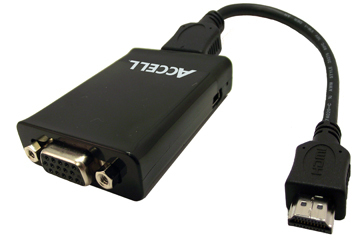
| Connector 1 | HDMI |
| Connector 2 | VGA |
| Design | |
| Product colour | Black |
| EAN | 826388106697 |
| Source: Icecat.biz | |
Connect a HDMI® Enabled Tablet, Smartphone, Computer or Other HDMI Device to a VGA Supported TV, Monitor or Projector
With the Accell UltraVideo adapter you can quickly connect your HDMI® enabled device to a VGA supported monitor, projector or TV. Use the included HDMI cable to connect the adapter to your HDMI device. Next, connect the supplied USB cable to an USB port for power or to the included USB AC adapter. Then connect your VGA cable to the adapter and a VGA display for a clear and sharp picture. There is no software to install making setup simple. The adapter supports TV resolutions up to 1080p or 1920x1200 60Hz (reduced blanking) for computers*.
Designed For Use With Mobile Devices
The Accell HDMI to VGA adapter uses premium components to ensure the highest performance and maximum ease of use with your mobile device. The adapter is designed to work with devices featuring the HDMI (Type A) connector.
Features:
- Easily Adapts an HDMI Device to VGA, No Software to Install
- Supports 1080p and Computer Resolutions up to 1920x1200 60Hz With Reduced Blanking
- Delivers up to 30-Bits of Color for Billions of Colors
- USB or AC Powered - USB Cable and AC Power Adapter are Included
Advanced Design and Construction
The Accell HDMI to VGA adapter uses premium components to ensure the highest performance and maximum ease of use with your mobile device. The adapter is designed to work with devices featuring the HDMI (Type A) connector.
With the Accell UltraVideo adapter you can quickly connect your HDMI® enabled device to a VGA supported monitor, projector or TV. Use the included HDMI cable to connect the adapter to your HDMI device. Next, connect the supplied USB cable to an USB port for power or to the included USB AC adapter. Then connect your VGA cable to the adapter and a VGA display for a clear and sharp picture. There is no software to install making setup simple. The adapter supports TV resolutions up to 1080p or 1920x1200 60Hz (reduced blanking) for computers*.
Designed For Use With Mobile Devices
The Accell HDMI to VGA adapter uses premium components to ensure the highest performance and maximum ease of use with your mobile device. The adapter is designed to work with devices featuring the HDMI (Type A) connector.
Features:
- Easily Adapts an HDMI Device to VGA, No Software to Install
- Supports 1080p and Computer Resolutions up to 1920x1200 60Hz With Reduced Blanking
- Delivers up to 30-Bits of Color for Billions of Colors
- USB or AC Powered - USB Cable and AC Power Adapter are Included
Advanced Design and Construction
The Accell HDMI to VGA adapter uses premium components to ensure the highest performance and maximum ease of use with your mobile device. The adapter is designed to work with devices featuring the HDMI (Type A) connector.
Multitronic Vaasa: 0 pcs
Estimated delivery: No delivery info
Estimated delivery: No delivery info
Today: 11:00 - 15:00
Multitronic Pietarsaari: 0 pcs
Estimated delivery: No delivery info
Estimated delivery: No delivery info
Today: Closed
Multitronic Jyväskylä: 0 pcs
Estimated delivery: No delivery info
Estimated delivery: No delivery info
Today: Closed
Multitronic Lappeenranta: 0 pcs
Estimated delivery: No delivery info
Estimated delivery: No delivery info
Today: Closed
Multitronic Mariehamn: 0 pcs
Estimated delivery: No delivery info
Estimated delivery: No delivery info
Today: 10:00 - 14:00
The above technical details are for reference only and may change without notice. We reserve the right to correct printing errors and use illustrations for guidance. Some text may be auto-generated or machine-translated, which could lead to inaccuracies.