

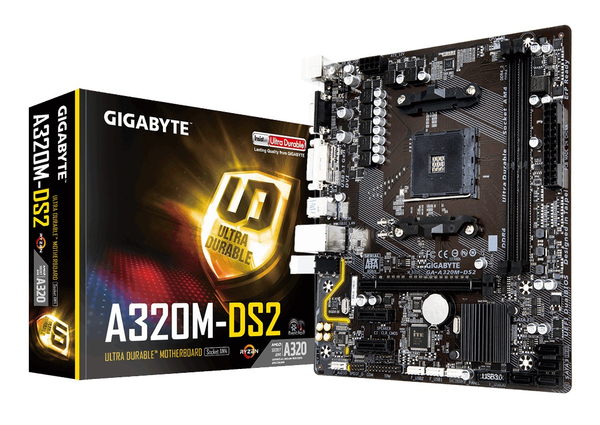
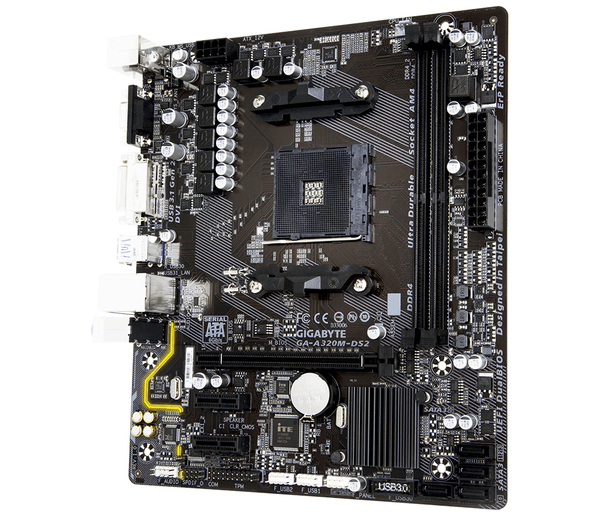
No price development information for this product.
Product unavailable
This product is end of life or currently not available.
This product is end of life or currently not available.
Key Specifications
Choose one or multiple features to search for items that have the same specifications.
Specifications
Description
Store availability
Delivery
Price development
| Processor | |
| Processor manufacturer | AMD |
| Maximum number of SMP processors | 1 |
| Compatible processor series | AMD A, AMD Athlon, AMD Athlon X4, AMD Ryzen 3, 2nd Generation AMD Ryzen™ 3, AMD Ryzen 3 3rd Gen, AMD Ryzen 5, 2nd Generation AMD Ryzen™ 5, 3rd Generation AMD Ryzen 5, AMD Ryzen 7, 2nd Generation AMD Ryzen™ 7, 3rd Generation AMD Ryzen 7, 3rd Generation AMD Ryzen 9 |
| Processor socket | AM4 |
| Memory | |
| Memory slots | 2 |
| Maximum internal memory | 32 GB |
| ECC |  |
| Non-ECC | |
| Supported memory clock speeds | 2133,2400,2667,2933,3200 MHz |
| Supported memory types | DDR3 |
| Memory channels | Dual-channel |
| Unbuffered memory | |
| Memory slots type | DIMM |
| Number of memory slots | 2 |
| Weight & dimensions | |
| Width | 226 mm |
| Depth | 195 mm |
| Networking | |
| Ethernet LAN | |
| Ethernet interface type | Gigabit Ethernet |
| Internal I/O | |
| USB 2.0 connectors | 2 |
| S/PDIF out connector | |
| CPU fan connector | |
| ATX Power connector (24-pin) | |
| Chassis intrusion connector | |
| Front panel audio connector | |
| TPM connector | |
| EPS power connector (8-pin) | |
| USB 3.2 Gen 1 (3.1 Gen 1) connectors | 1 |
| Number of SATA III connectors | 4 |
| Serial port headers | 1 |
| Audio connector | |
| Front panel connector | |
| Back panel I/O ports | |
| PS/2 ports quantity | 1 |
| USB 2.0 ports quantity | 2 |
| Ethernet LAN (RJ-45) ports | 1 |
| Microphone in | |
| VGA (D-Sub) ports quantity | 1 |
| DVI-D ports quantity | 1 |
| USB 3.2 Gen 1 (3.1 Gen 1) Type-A ports quantity | 3 |
| USB 3.2 Gen 2 (3.1 Gen 2) Type-A ports quantity | 1 |
| Storage controllers | |
| RAID levels | 0,1,10 |
| Packaging content | |
| Bundled software | Norton Internet Security, cFosSpeed |
| Expansion slots | |
| PCI Express x16 slots | 1 |
| PCI Express x1 slots | 2 |
| BIOS | |
| BIOS memory size | 128 Mbit |
| BIOS type | UEFI AMI |
| ACPI version | 5.0 |
| Clear CMOS jumper | |
| Graphics | |
| Maximum graphics card memory | 2000 MB |
| Maximum resolution | 1920 x 1200 pixels |
| Parallel processing technology support |  |
| Processor special features | |
| Intel Extreme Memory Profile (XMP) | |
| Performance | |
| Motherboard form factor | Micro ATX |
| Features | |
| Motherboard chipset | AMD A320 |
| Motherboard form factor | Micro ATX |
| Audio output channels | 7.1 channels |
| PC health monitoring | Fan, Temperature, Voltage |
| Windows operating systems supported | Windows 10 Education x64,Windows 10 Enterprise x64,Windows 10 Home x64,Windows 10 Pro x64,Windows 7 Enterprise x64,Windows 7 Home Basic x64,Windows 7 Home Premium x64,Windows 7 Professional x64,Windows 7 Starter x64,Windows 7 Ultimate x64 |
| Power source type | ATX |
| Motherboard chipset family | AMD |
| Component for | PC |
| Audio chip | Realtek ALC887 |
| Motherboard | |
| Motherboard form factor | Micro ATX |
| EAN | 4719331801588 |
| Warranty | 1 year |
With Smart Fan 5 users can ensure that their gaming PC can maintain its performance while staying cool. Smart Fan 5 allows users to interchange their fan headers to reflect different thermal sensors at different locations on the motherboard. Not only that, with Smart Fan 5 more hybrid fan headers that support both PWM and Voltage mode fans have been introduced to make the motherboard more liquid cooling friendly.
All Hybrid Fan Pin Headers
- All Hybrid Fan Headers can automatically detect the type of cooling device whether it be fan or pump with different PWM or Voltage mode.
- Supports up to 2 amps with built-in overcurrent protection—a must for high-end high current fans.
New Smart Fan 5 Software
Interoperable Sensors and Fans
Each fan can be customized to operate at different speeds according to any defined temperature source input (except the CPU fan).
Fan Curve
Customize fan curves based on specific temperatures with the intuitive graphical UI.
Choose from different modes, Quiet to Full Speed, to match your system usage scenario. For each fan or pump, you can use the intuitive fan curve to define trigger thresholds and corresponding fan speeds.
Enhanced BIOS Interface
The enhanced BIOS interface also has the advanced features seen in the Smart Fan 5 UI, such as: the ability to set triggers based on different temperature sensors on the board, fan curve definition and the temperature interval setting, which can prevent fan rotation noise caused by sudden temperature change—all without having to load Windows.
Realtek GbE LAN with cFosSpeed Internet Accelerator Software
Realtek Gigabit LAN features cFosSpeed, a network traffic management application which helps to improve network latency and maintain low ping times to deliver better responsiveness in crowded LAN environments.
Fast USB 3.1 Gen 2 Solution
The latest USB 3.1 Gen 2 offers staggering 10Gb/s transfer speeds. 2x faster than USB 3.1 Gen 1 along with backwards compatibility with existing USB devices.
GIGABYTE Patented Double Locking Bracket
Anti-Sulfur Resistor Design
Sulfur compounds in the air can penetrate tiny onboard resistors creating chemical change and causing these resistors to open or short. If either of these occurs the motherboard will fail to function. By equipping resistors with an Anti-Sulfur Design GIGABYTE gives Ultra Durable Motherboards a whole new meaning.
High Quality Onboard Audio Design
Delivers high quality sound resolution and sound expansion to create the most realistic sound effects for professional gamers.
Humidity Protection Glass Fabric PCB
There is nothing more harmful to the longevity of your PC than moisture, and most parts of the world experience moisture in the air as humidity at some point during the year. GIGABYTE motherboards have been designed to make sure that humidity is never an issue, incorporating a new Glass Fabric PCB technology that repels moisture caused by humid and damp conditions. Glass Fabric PCB technology uses a new PCB material which reduces the amount of space between the fiber weave, making it much more difficult for moisture to penetrate compared to traditional motherboard PCBs. This offers much better protection from short circuit and system malfunction caused by humid and damp conditions.
High Temperature Protection Lower RDS(on) MOSFETs Design
GIGABYTE motherboards use Low RDS(on) MOSFETs which reduce energy wastage through unnecessary residual heat dissipation. This all amounts to tangible energy savings which are beneficial for both end-users and the environment without impacting system performance.
Refreshed BIOS Easy, Smart, and Friendly
The BIOS is essential for users during initial setup to allow for the most optimal settings. With a new GUI and easier to use functionalities, GIGABYTE has been able to reinvent the BIOS to give users a better experience while setting up their new system.
GIGABYTE APP Center
The GIGABYTE APP Center gives you easy access to a wealth of GIGABYTE apps that help you get the most from your GIGABYTE motherboard. Using a simple, unified user interface, GIGABYTE APP Center allows you to easily launch all GIGABYTE apps installed on your system, check related updates online, and download the latest apps, drivers, and BIOS.
EasyTune™
GIGABYTE's EasyTune™ is a simple and easy-to-use interface that allows users to fine-tune their system settings or adjust system and memory clocks and voltages in a Windows environment. With Smart Quick Boost, one click is all it takes to automatically overclock your system, giving an added performance boost when you need it the most.
Overclocking to Boost Your Frame Rates
Get the highest levels of performance from your PC with easy-to-use GIGABYTE overclocking features.
System Information Viewer
GIGABYTE System Information Viewer is a central location that gives you access to your current system status. Monitor components such as the clocks and processor, set your preferred fan speed profile, create alerts when temperatures get too high or record your system’s behavior; these are the possibilities of the System Information Viewer.
@BIOS
The GIGABYTE @BIOS app allows you to update your system’s BIOS from within Windows using a simple and slick graphical user interface. @BIOS can automatically download the latest version from the GIGABYTE servers or you can update your BIOS from a file on your computer. @BIOS also allows you to save your current BIOS to a file, recover your previous BIOS from an image and backup your BIOS to an image.
3D OSD
3D OSD automatically detects and displays your system information during games, allowing you to easily get a hold of your system information without switching between screens.
GIGABYTE Patented DualBIOS™ (UEFI) Design
GIGABYTE Ultra Durable™ motherboards feature GIGABYTE DualBIOS™, an exclusive technology from GIGABYTE that protects arguably one of your PC's most crucial components, the BIOS. GIGABYTE DualBIOS™ means that your motherboard has both a 'Main BIOS' and a 'Backup BIOS', protecting users from BIOS failure due to virus, hardware malfunction, improper OC settings or power failure during the update process.
XSplit Gamecaster + Broadcaster: Cast Your Game Anytime, Anywhere
Now set up your stage and share the greatest gaming moments with XSplit Gamecaster + Broadcaster! Fully optimized social media integration is ready for real-time chats—keeping you notified yet focused in the game. It takes just one click to stream your gameplay to Twitch. Host your game like a pro!
TriDef® SmartCam | Custom Stream Modding
To facilitate being the full streaming solution each GIGABYTE motherboard includes TriDef® SmartCam software, you are now able to remove backgrounds without the hassle of using a green screen. Through the SmartCam application you can now apply live filters, and fully control your background, not only while streaming, but also through other video applications such as Skype.
All Hybrid Fan Pin Headers
- All Hybrid Fan Headers can automatically detect the type of cooling device whether it be fan or pump with different PWM or Voltage mode.
- Supports up to 2 amps with built-in overcurrent protection—a must for high-end high current fans.
New Smart Fan 5 Software
Interoperable Sensors and Fans
Each fan can be customized to operate at different speeds according to any defined temperature source input (except the CPU fan).
Fan Curve
Customize fan curves based on specific temperatures with the intuitive graphical UI.
Choose from different modes, Quiet to Full Speed, to match your system usage scenario. For each fan or pump, you can use the intuitive fan curve to define trigger thresholds and corresponding fan speeds.
Enhanced BIOS Interface
The enhanced BIOS interface also has the advanced features seen in the Smart Fan 5 UI, such as: the ability to set triggers based on different temperature sensors on the board, fan curve definition and the temperature interval setting, which can prevent fan rotation noise caused by sudden temperature change—all without having to load Windows.
Realtek GbE LAN with cFosSpeed Internet Accelerator Software
Realtek Gigabit LAN features cFosSpeed, a network traffic management application which helps to improve network latency and maintain low ping times to deliver better responsiveness in crowded LAN environments.
Fast USB 3.1 Gen 2 Solution
The latest USB 3.1 Gen 2 offers staggering 10Gb/s transfer speeds. 2x faster than USB 3.1 Gen 1 along with backwards compatibility with existing USB devices.
GIGABYTE Patented Double Locking Bracket
Anti-Sulfur Resistor Design
Sulfur compounds in the air can penetrate tiny onboard resistors creating chemical change and causing these resistors to open or short. If either of these occurs the motherboard will fail to function. By equipping resistors with an Anti-Sulfur Design GIGABYTE gives Ultra Durable Motherboards a whole new meaning.
High Quality Onboard Audio Design
Delivers high quality sound resolution and sound expansion to create the most realistic sound effects for professional gamers.
Humidity Protection Glass Fabric PCB
There is nothing more harmful to the longevity of your PC than moisture, and most parts of the world experience moisture in the air as humidity at some point during the year. GIGABYTE motherboards have been designed to make sure that humidity is never an issue, incorporating a new Glass Fabric PCB technology that repels moisture caused by humid and damp conditions. Glass Fabric PCB technology uses a new PCB material which reduces the amount of space between the fiber weave, making it much more difficult for moisture to penetrate compared to traditional motherboard PCBs. This offers much better protection from short circuit and system malfunction caused by humid and damp conditions.
High Temperature Protection Lower RDS(on) MOSFETs Design
GIGABYTE motherboards use Low RDS(on) MOSFETs which reduce energy wastage through unnecessary residual heat dissipation. This all amounts to tangible energy savings which are beneficial for both end-users and the environment without impacting system performance.
Refreshed BIOS Easy, Smart, and Friendly
The BIOS is essential for users during initial setup to allow for the most optimal settings. With a new GUI and easier to use functionalities, GIGABYTE has been able to reinvent the BIOS to give users a better experience while setting up their new system.
GIGABYTE APP Center
The GIGABYTE APP Center gives you easy access to a wealth of GIGABYTE apps that help you get the most from your GIGABYTE motherboard. Using a simple, unified user interface, GIGABYTE APP Center allows you to easily launch all GIGABYTE apps installed on your system, check related updates online, and download the latest apps, drivers, and BIOS.
EasyTune™
GIGABYTE's EasyTune™ is a simple and easy-to-use interface that allows users to fine-tune their system settings or adjust system and memory clocks and voltages in a Windows environment. With Smart Quick Boost, one click is all it takes to automatically overclock your system, giving an added performance boost when you need it the most.
Overclocking to Boost Your Frame Rates
Get the highest levels of performance from your PC with easy-to-use GIGABYTE overclocking features.
System Information Viewer
GIGABYTE System Information Viewer is a central location that gives you access to your current system status. Monitor components such as the clocks and processor, set your preferred fan speed profile, create alerts when temperatures get too high or record your system’s behavior; these are the possibilities of the System Information Viewer.
@BIOS
The GIGABYTE @BIOS app allows you to update your system’s BIOS from within Windows using a simple and slick graphical user interface. @BIOS can automatically download the latest version from the GIGABYTE servers or you can update your BIOS from a file on your computer. @BIOS also allows you to save your current BIOS to a file, recover your previous BIOS from an image and backup your BIOS to an image.
3D OSD
3D OSD automatically detects and displays your system information during games, allowing you to easily get a hold of your system information without switching between screens.
GIGABYTE Patented DualBIOS™ (UEFI) Design
GIGABYTE Ultra Durable™ motherboards feature GIGABYTE DualBIOS™, an exclusive technology from GIGABYTE that protects arguably one of your PC's most crucial components, the BIOS. GIGABYTE DualBIOS™ means that your motherboard has both a 'Main BIOS' and a 'Backup BIOS', protecting users from BIOS failure due to virus, hardware malfunction, improper OC settings or power failure during the update process.
XSplit Gamecaster + Broadcaster: Cast Your Game Anytime, Anywhere
Now set up your stage and share the greatest gaming moments with XSplit Gamecaster + Broadcaster! Fully optimized social media integration is ready for real-time chats—keeping you notified yet focused in the game. It takes just one click to stream your gameplay to Twitch. Host your game like a pro!
TriDef® SmartCam | Custom Stream Modding
To facilitate being the full streaming solution each GIGABYTE motherboard includes TriDef® SmartCam software, you are now able to remove backgrounds without the hassle of using a green screen. Through the SmartCam application you can now apply live filters, and fully control your background, not only while streaming, but also through other video applications such as Skype.
Multitronic Vaasa: 0 pcs
Estimated delivery: No delivery info
Estimated delivery: No delivery info
Today: 10:00 - 18:00
Multitronic Pietarsaari: 0 pcs
Estimated delivery: No delivery info
Estimated delivery: No delivery info
Today: 09:00 - 17:00
Multitronic Jyväskylä: 0 pcs
Estimated delivery: No delivery info
Estimated delivery: No delivery info
Today: 10:00 - 17:00
Multitronic Lappeenranta: 0 pcs
Estimated delivery: No delivery info
Estimated delivery: No delivery info
Today: 10:00 - 18:00
Multitronic Mariehamn: 0 pcs
Estimated delivery: No delivery info
Estimated delivery: No delivery info
Today: 10:00 - 17:00
The above technical details are for reference only and may change without notice. We reserve the right to correct printing errors and use illustrations for guidance. Some text may be auto-generated or machine-translated, which could lead to inaccuracies.