

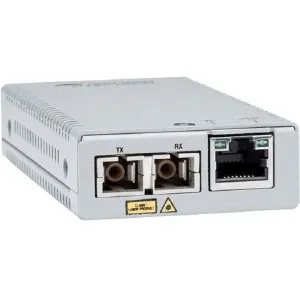
ALLIED TAA 10/100/1000T to 1000SX/SC MM Media & Rate Converter Multi-region PSU
Manufacturer: ALLIED TELESIS
ID: AT-MMC2000/SC-960
37590€
Show VAT 0%
Show VAT 25,5%
Multitronic Vaasa
Multitronic Pietarsaari
Multitronic Jyväskylä
Multitronic Lappeenranta
Multitronic Mariehamn
Specifications
Description
Store availability
Delivery
Price development
Manuals
| Ports & interfaces | |
| Connectivity technology | Wired |
| Ethernet LAN (RJ-45) ports | 1 |
| Fiber ports quantity | 2 |
| Fiber optic connector | SC |
| Weight & dimensions | |
| Weight | 170 g |
| Height | 21.8 mm |
| Width | 59 mm |
| Depth | 101.6 mm |
| Energy management | |
| Input voltage | 12 V |
| Input current | 0.14 A |
| Operational conditions | |
| Operating altitude | 0 - 3048 m |
| Operating relative humidity (H-H) | 5 - 95% |
| Storage temperature (T-T) | -30 - 70 °C |
| Operating temperature (T-T) | 0 - 50 °C |
| Storage relative humidity (H-H) | 5 - 95% |
| Networking | |
| Maximum data transfer rate | 1000 Mbit/s |
| Networking standards | IEEE 802.1Q |
| Jumbo frames support |  |
| Ethernet LAN data rates | 10,100,1000 Mbit/s |
| VLAN support | |
| Ethernet interface type | Gigabit Ethernet |
| Fiber ethernet cabling technology | 1000BASE‑SX |
| Duplex system | Full |
| Converter input interface | 10Base-T, 100Base-T, 1000Base-T |
| Converter output interface | 1000Base-SX |
| Certificates | |
| Certification | CE, UL60950-1, EN60950-1, FCC Class A, EN55022 Class A, CISPR 22 Class A, C-TICK, VCCI |
| Packaging content | |
| Manual | |
| Quick installation guide | |
| User guide | |
| Performance | |
| Wavelength | 850 nm |
| Fiber mode structure | Multi-mode |
| Maximum transfer distance | 500 m |
| Features | |
| Internal |  |
| Plug and Play | |
| Product colour | Grey |
| Logistics data | |
| Harmonized System (HS) code | 85176990 |
| EAN | 0767035218618 |
| Warranty | 2 years |
| Source: Icecat.biz | |
Gigabit Ethernet to Fiber Mini Media and Rate Converter
This standalone mini media and rate converter features 10/100/1000T to 1000SX conversion with a multi-mode SC fiber connector and supports from 220 m to 500 m. It is compatible with the MMCR18 rack-mount chassis.
Copper to Fiber Mini Media and Rate Converters
Overview
The Allied Telesis MMC Series of mini media converters leverages its smaller size to not only help the environment with a small carbon footprint, but also to save space in its working environment. Despite its compact size, the MMC Series delivers all the power and functionality of standard size media converters.
Extend Networks
The MMC Series are available in 100Mbps or 1000Mbps models. Depending on the model chosen, the fiber-optic port has options for fixed SC, ST, LC or SFP connectors capable of multi-mode or single-mode fiber connectivity. The twisted-pair copper port has an RJ-45 connector supporting either 100Mbps or 1000Mbps, with a maximum operating distance of 100 meters (328 feet).
VLAN Support
Many new backbone switch products now support the industry-standard IEEE 802.1Q specification for Virtual LANs (VLANs) that send extra-long data packets on the network. The MMC Series are fully compatible with these long packets, enabling them to be used in modern networks. Media converters not supporting this feature discard these extra long packets, making them unsuitable for modern networks.
Small and Flexible
The smaller size and external power supply of the MMC Series allows them to be used almost anywhere.
Smart MissingLink (SML)
The Smart MissingLink™ (SML) feature monitors network connections and provides notification when network segments fail, allowing network managers to quickly identify the source and location of failed segments and minimize downtime.
Smart Link Restoration
Smart Link restoration allows the devices, in cases of power failure, link loss or other interrupted service, to automatically restore the link without the need to restart/reset them.
Power Saving
The MMC Series continues the Allied Telesis commitment to the environment with over 50% power savings. With just 1.7W of power usage, the MMC Series media converters are some of the most efficient in the market today.
Link Test
The link test is a fast and easy way for you to test the connections between the media converter ports and the connected end nodes. If a network problem occurs, you can perform a link test to determine which port is experiencing a problem, and focus your troubleshooting efforts on the right cable or end node.
This standalone mini media and rate converter features 10/100/1000T to 1000SX conversion with a multi-mode SC fiber connector and supports from 220 m to 500 m. It is compatible with the MMCR18 rack-mount chassis.
Copper to Fiber Mini Media and Rate Converters
Overview
The Allied Telesis MMC Series of mini media converters leverages its smaller size to not only help the environment with a small carbon footprint, but also to save space in its working environment. Despite its compact size, the MMC Series delivers all the power and functionality of standard size media converters.
Extend Networks
The MMC Series are available in 100Mbps or 1000Mbps models. Depending on the model chosen, the fiber-optic port has options for fixed SC, ST, LC or SFP connectors capable of multi-mode or single-mode fiber connectivity. The twisted-pair copper port has an RJ-45 connector supporting either 100Mbps or 1000Mbps, with a maximum operating distance of 100 meters (328 feet).
VLAN Support
Many new backbone switch products now support the industry-standard IEEE 802.1Q specification for Virtual LANs (VLANs) that send extra-long data packets on the network. The MMC Series are fully compatible with these long packets, enabling them to be used in modern networks. Media converters not supporting this feature discard these extra long packets, making them unsuitable for modern networks.
Small and Flexible
The smaller size and external power supply of the MMC Series allows them to be used almost anywhere.
Smart MissingLink (SML)
The Smart MissingLink™ (SML) feature monitors network connections and provides notification when network segments fail, allowing network managers to quickly identify the source and location of failed segments and minimize downtime.
Smart Link Restoration
Smart Link restoration allows the devices, in cases of power failure, link loss or other interrupted service, to automatically restore the link without the need to restart/reset them.
Power Saving
The MMC Series continues the Allied Telesis commitment to the environment with over 50% power savings. With just 1.7W of power usage, the MMC Series media converters are some of the most efficient in the market today.
Link Test
The link test is a fast and easy way for you to test the connections between the media converter ports and the connected end nodes. If a network problem occurs, you can perform a link test to determine which port is experiencing a problem, and focus your troubleshooting efforts on the right cable or end node.
Multitronic Vaasa: 0 pcs
Estimated delivery: 02.11
Estimated delivery: 02.11
Today: 10:00 - 18:00
Multitronic Pietarsaari: 0 pcs
Estimated delivery: 02.11
Estimated delivery: 02.11
Today: 09:00 - 17:00
Multitronic Jyväskylä: 0 pcs
Estimated delivery: 02.11
Estimated delivery: 02.11
Today: 10:00 - 17:00
Multitronic Lappeenranta: 0 pcs
Estimated delivery: 02.11
Estimated delivery: 02.11
Today: 10:00 - 18:00
Multitronic Mariehamn: 0 pcs
Estimated delivery: 02.11
Estimated delivery: 02.11
Today: 10:00 - 17:00
Fetch from the shop
Estimated delivery time: 02.11
Estimated delivery time: 02.11
Posti: Parcel lockers and service points
Estimated delivery time: 02.11
Estimated delivery time: 02.11
Posti: Postal package
Estimated delivery time: 03.11
Estimated delivery time: 03.11
Matkahuolto: Parcel lockers and service points
Estimated delivery time: 03.11
Estimated delivery time: 03.11
Posti: Doorstep delivery
Estimated delivery time: 03.11
Estimated delivery time: 03.11
Matkahuolto: Business Parcel
Estimated delivery time: 02.11
Estimated delivery time: 02.11
Matkahuolto: Home Parcel
Estimated delivery time: 02.11
Estimated delivery time: 02.11
Posti: Home delivery
Estimated delivery time: 03.11
Estimated delivery time: 03.11
- leaflet (English)
- manual pdf (English)
The above technical details are for reference only and may change without notice. We reserve the right to correct printing errors and use illustrations for guidance. Some text may be auto-generated or machine-translated, which could lead to inaccuracies.